About this app
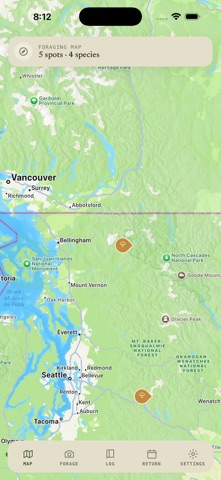
Mycelia is your personal foraging companion. Photograph a mushroom and get an instant species identification with confidence score and edibility rating. Save geotagged finds to your map, track seasonal patterns, and build a foraging history across all your devices. Foraging is better together: share the finds you choose with the Mycelia community and see what fellow foragers are discovering — every find stays private unless you decide otherwise. As we like to say: you don't find mushrooms, mushrooms find you. Features: • Photo identification with confidence score and edibility badge • Geotagged finds on your foraging map — private by default • Community map: see other foragers' shared finds, with photo galleries • Return-season predictions and reminders for saved spots • Cloud sync across devices Safety first: Mycelia's identifications are for reference only. Never eat a wild mushroom based solely on an app — always verify with an expert.
Latest release
What’s New
Mycelia has been rebuilt around one question: what's this mushroom? IDENTIFY FIRST • Home now opens on a single Identify button — photograph a mushroom and get an answer in seconds. • Today's finds shows what you've logged since this morning, pinned to a mini-map. SAFETY BUILT IN • Every find now carries a "Before you pick" card naming the toxic look-alikes for that species, and how to tell them apart. • Edibility is labelled on every entry in your log. • One tap sends a find to iNaturalist when you want a human to confirm it. A SIMPLER APP • Five tabs became two — Home and Collected — with the lens always in reach at the centre. • Collected holds everything: a dated timeline, a by-species view, and your foraging map, all behind one switch. • Private and Community finds share a single toggle, so it's always clear whose finds you're looking at. ALSO • Return predictions estimate when each spot is likely to fruit again. • Share a find as a card, or open directions straight back to the spot. • New pine-dusk theme. Never eat a wild mushroom based on an app alone. Always confirm with an expert forager or a field guide.
Audience growth
Ratings growth
Baseline captured. Growth appears after the crawler observes a changed rating count.
Momentum comes from crawler snapshots for the tracked storefront. “Viral growth signal” means unusually fast recent rating gains; it is an indicator, not download data.
Price tracking
Price intelligence
First snapshot captured. The trend line starts after the next crawler price observation.
- First observed Aug 20, 2026 · 2:24 PM Free
Screenshots