About this app
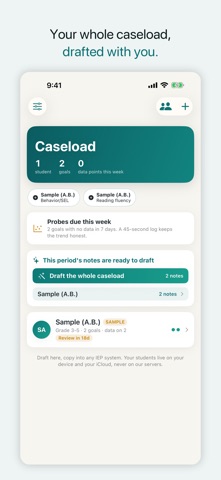
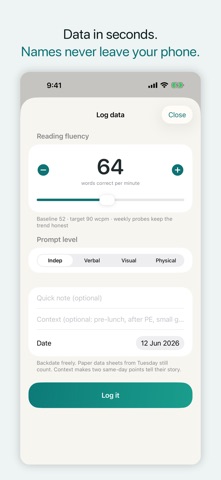
Student data never leaves your device or your iCloud — we keep zero student records on our servers. And when progress reports come due, GoalDraft turns a quarter of logged data into parent-ready progress notes in minutes. Your data is auto-saved to your own iCloud — never lost, never stuck in an unreadable export. Clean CSV plus a meeting-ready PDF you can actually hand to the team. DRAFT MEASURABLE GOALS Type a baseline, get a draft annual goal with a real structure check: a timeframe, a condition, an observable behavior, and a criterion whose unit matches your baseline. Start from a bank of 86 measurable goal starters, including phoneme-level articulation and task-analysis chains. The target comes from your data, never a canned 80%. COLLECT DATA THE WAY IT ACTUALLY HAPPENS Pick the collector that fits the goal: correct/incorrect trials, step-by-step task analysis, interval sampling, incident logging with antecedent and setting, timers, latency, or a probe score. Backdate freely. Log a whole group in one session screen. A Lock Screen widget puts logging one tap away. TURN DATA INTO FILING-READY WORK Progress notes open with the status you choose, cite the median against the baseline, compare to the goal criterion, and name the measurement method. Draft present levels (PLAAFP) and meeting talking points. Generate a meeting-ready report PDF: one page per goal with the chart, the aimline, the on-track verdict, and the recent data. STAY AHEAD OF EVERY DEADLINE A compliance dashboard rolls up every annual review and reevaluation, sorted by how soon each lands, with optional countdown alerts at 45, 14, and 3 days. Alerts are worded without student nicknames unless you opt in. When the last three data points meet a goal's criterion, GoalDraft flags it — marking a goal met, moving it to maintenance, or reactivating it is always your call. SEE WHAT MATTERS Every goal gets a trend line, an aimline, and an honest on-track verdict. When a goal is off pace, GoalDraft shows a concrete playbook instead of a red badge. Behavior goals get a time-of-day and antecedent pattern view for the team meeting. PRIVACY BY CONSTRUCTION There is no field for a student's name anywhere in the app. Your caseload lives on your device and your personal iCloud, never on our servers. Drafting requests are de-identified before they leave your phone. Export every data point as CSV any time. Your data is yours. FREE AND PRO Track unlimited goals and data for free, with a monthly allowance of goal drafts and notes. GoalDraft Pro unlocks unlimited drafting, present levels, meeting prep, and the report PDF, with a 14-day free trial. GoalDraft drafts; you are always the author. It does not make legal or compliance claims, and your professional judgment and your district's process decide what you file. Questions: support@keenshift.ai Terms of Use: https://goaldraft.keenshift.ai/terms Privacy Policy: https://goaldraft.keenshift.ai/privacy
Latest release
What’s New
A greyed-out button now tells you why. “Draft this goal” names the box it is waiting on, and so does every other main action: present levels, talking points, the meeting report PDF, batch notes, the narrative drafter, and the CSV export. On the batch screens the reason names the student and the goal, so you are not scrolling the caseload to find the row. Your numbers are echoed exactly. A baseline of 3.75 stays 3.75 on the goal, on the chart’s baseline and target lines, in the CSV export, and in the meeting report PDF. Closer reading of what you typed. The “use this number” chips no longer lift a value out of context — “-56” is not 56, “.5” is 0.5, and “the next 6 days” is a deadline, not a score. “wpm” now means words per minute and is no longer recorded as words correct per minute, and a percentage is no longer accepted beside a percentile rank. If the unit words in your sentence disagree with your UNIT box, the form says so before you draft — it does not block you, and the goal is written in the UNIT box’s words. Clearer note drafting. When a note needs a data point first, the message names the goal that is short instead of leaving the button off with no explanation. Plan screen. It shows progress while a purchase is going through, and says when a plan cannot be loaded rather than offering a button that cannot work. Also: a draft request that is refused before it runs no longer uses up one of your free drafts.
Audience growth
Ratings growth
Baseline captured. Growth appears after the crawler observes a changed rating count.
Momentum comes from crawler snapshots for the tracked storefront. “Viral growth signal” means unusually fast recent rating gains; it is an indicator, not download data.
Price tracking
Price intelligence
First snapshot captured. The trend line starts after the next crawler price observation.
- First observed Aug 19, 2026 · 7:26 AM Free
Screenshots