About this app
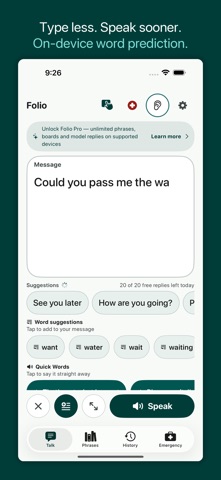
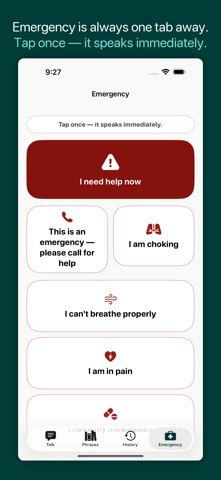
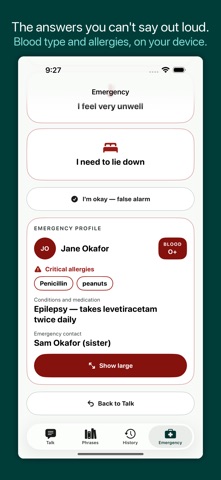
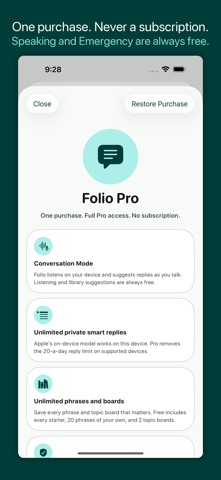
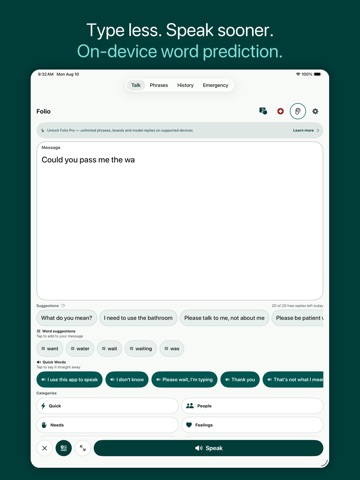
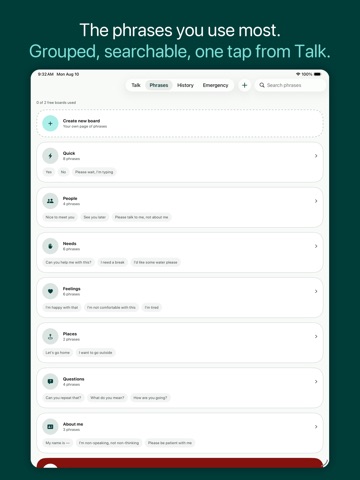
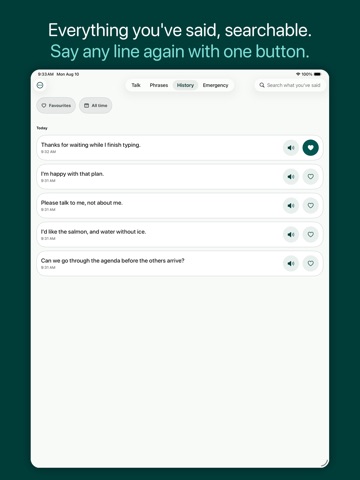
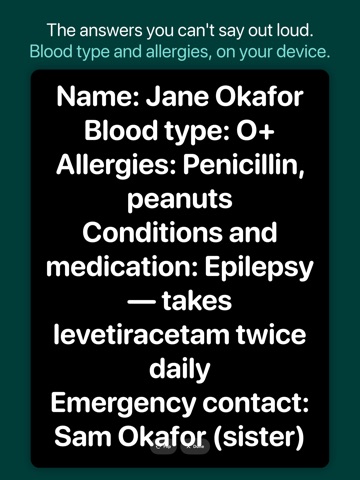
Folio is private text AAC for people who type to speak. Type a message, tap Speak, or reuse a saved phrase. There is no Folio account, no advertising, and no subscription. TYPE LESS. KEEP CONTROL. • On-device word prediction helps complete the message in front of you. • Private library suggestions surface phrases you chose to save. • On supported Apple Intelligence devices, Folio can offer additional replies using Apple's on-device model. • Suggestions never insert or speak themselves. You choose and can edit every word. COMMUNICATE YOUR WAY • Use Apple system voices and Personal Voice where supported. • Show a message full-screen with Big Display for noisy rooms or across a counter. • Reach a fixed emergency phrase board from its own tab, one tap away from anywhere in the app. • Add optional medical information — blood type, allergies, conditions, an emergency contact — that appears on the emergency board for someone helping you to read. It stays on your device, is never spoken aloud, and Folio does not contact anyone for you. • Search everything you have said, grouped by day, and say any line again with one tap. • Turn on Atkinson Hyperlegible, a typeface designed to make similar letters easier to tell apart, for your messages and phrases. • Organize saved phrases into categories and topic boards. • Expand abbreviations, review recent speech, and add pronunciation overrides for names or other important words. • Export a local backup file that you control. IS FOLIO THE RIGHT TOOL? Folio is for people who spell. It is a text composer with prediction, saved phrases and speech: it does not include a picture-symbol library or a symbol grid. If the person you are supporting communicates with symbols rather than letters, a symbol-based AAC app will serve them better, and we would rather you knew that before paying. CONVERSATION MODE, ON DEVICE With your permission, Listen uses Apple's on-device speech recognition to transcribe a conversation partner and suggest possible replies. Microphone and Speech Recognition permissions are optional. If Listen is unavailable or permission is denied, typing and speaking continue to work. Folio does not upload audio, transcripts, drafts, messages, phrase history, medical information or suggestions to KeenShift. Apart from Apple's own App Store purchase check, Folio makes no network requests at all. ACCESSIBILITY BUILT INTO COMMUNICATION Folio's own auto and step scanning covers the Talk and Emergency screens, with adjustable timing and optional spoken highlights. Select a highlighted item with a screen tap. Management screens such as Settings and phrase editing work with iOS Switch Control. Folio also supports VoiceOver, Dynamic Type, a high-contrast setting, dark appearance, large touch targets, and a Settings PIN. FREE CORE. ONE-TIME PRO. Typing, text-to-speech, Listen, Emergency, the medical card, built-in scanning, library suggestions, starter phrases, 20 custom phrases, and 2 topic boards are available without Folio Pro. Folio Pro Lifetime unlocks unlimited custom phrases and boards and, on supported devices, removes the 20-per-day Apple-model suggestion limit. It is one purchase, not a subscription, and supports Family Sharing. The App Store shows your regional price before payment. Folio is a communication tool, not a medical device or emergency service. Keep an appropriate backup way to communicate or seek help. Privacy Policy: https://folio.keenshift.ai/privacy Terms of Use: https://folio.keenshift.ai/terms
Latest release
What’s New
Emergency is one tap away from everywhere now. EMERGENCY IS A TAB The emergency board used to be a sheet you opened from Talk, so reaching it meant getting out of whatever was in front of you first. Folio now has four permanent tabs — Talk, Phrases, History, Emergency — and the board is one tap away from any of them, mid-sentence included. A CALMER LOOK, AND A BIGGER SPEAK New colours, rounder cards and full-width buttons you can hit without aiming. Speak now runs the whole width of the screen at every text size, instead of sharing a row at ordinary sizes and going full width only at the largest ones. Clear, Undo, Save phrase and Show large kept their own row above it, all still at least 56 points. MORE OF YOUR OWN WORDS ON TALK Your quick words, your recent phrases and your topic boards are on the Talk screen itself, so the things you say most are not behind a tab. You can also save the message you just typed straight into your phrases without leaving what you were saying. PHRASES YOU CAN SEE INTO Boards are a card index that shows you some of what is inside each one before you open it, and a board opens as a grid of tiles rather than a list of rows. HISTORY WORTH KEEPING Star the lines you say often and filter down to just those, or narrow to today, the last 7 days, the last 30 days, or everything. A PHONE CALL NO LONGER TAKES YOUR VOICE Folio now handles calls, headphones being unplugged and audio resets. Before, a call arriving mid-sentence could leave Speak stuck and quietly swallow every tap after it. Speech also moved off the main thread, so the app stays responsive while it is talking. SCANNING THAT SURVIVES AN INTERRUPTION A switch scanning session now comes back after something interrupts it, like a call or an alert, and ends when you end it. ALSO FIXED White labels on the main action buttons now clear WCAG AA in dark appearance. The Continue button in the welcome screens is centred. A brief App Store outage no longer asks somebody who already owns Folio Pro to buy it again.
Audience growth
Ratings growth
Baseline captured. Growth appears after the crawler observes a changed rating count.
Momentum comes from crawler snapshots for the tracked storefront. “Viral growth signal” means unusually fast recent rating gains; it is an indicator, not download data.
Price tracking
Price intelligence
First snapshot captured. The trend line starts after the next crawler price observation.
- First observed Aug 19, 2026 · 7:26 AM Free
Screenshots