About this app
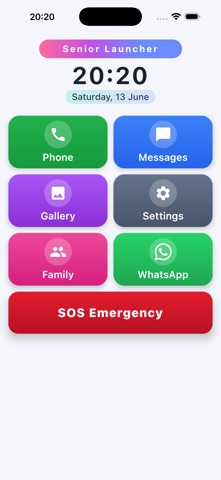
Senior Launcher is a simple, big-button home base for older people: everything that matters on one screen, in text large enough to read at arm's length. Open it and you get Phone, Messages, Photos, Family, WhatsApp, Reminders, Notes and a Medical Info card as large, clearly labelled tiles. No tiny icons, no hunting through menus. WHY CAREGIVERS LOVE IT Setting up a phone for an elderly parent is stressful. We hide the clutter and put the important things front and centre, so your loved one can use their phone independently. SOS EMERGENCY BUTTON One tap asks for confirmation, then sends an emergency message with your location to the contacts you choose. It works through the phone's own messaging app, so there is no extra account and no subscription. You can edit the wording yourself. EMERGENCY CONTACT ON THE HOME SCREEN Pin one person, a daughter, a son or a neighbour, to a large red button on the main screen. One tap calls them. Set or change who it is right there, with no settings to dig through. FAMILY CONTACTS, ONE-TAP CALLING Add family, doctors and carers as favourites and label them by relationship: Son, Daughter, Spouse, Doctor, Nurse, Friend and more. Call, text or WhatsApp them with a single tap, with no long contact list to scroll. REMINDERS FOR MEDICATION AND APPOINTMENTS Set a reminder once, every day, or on a chosen day of the week. "Take blood pressure pill", "Doctor at 10". The phone gives a clear notification at the right time. BIG-PRINT NOTES YOU CAN HEAR Write notes in large, clear text and tap Read aloud to have the phone read them back. Useful for anyone whose eyes tire quickly. MEDICAL INFO CARD Keep blood type, allergies, conditions, current medications, date of birth and the doctor's number in one place. Show the screen to a doctor or first responder, and optionally attach the details to the SOS message automatically. DESIGNED FOR LOW VISION EXTRA LARGE BUTTONS: big, clearly labelled tiles that fill the whole screen. ADJUSTABLE TEXT: Medium, Large or Extra Large. HIGH CONTRAST: a theme built for tired eyes, plus Light and Dark. NO ACCIDENTAL ROTATION: the layout stays in portrait. KEEP SCREEN ON: the phone does not lock itself while the app is open, so nobody has to re-enter a PIN halfway through. SPOKEN AND FELT FEEDBACK VOICE FEEDBACK: the app reads button names aloud. HAPTIC FEEDBACK: a gentle vibration confirms every press. PRIVATE BY DEFAULT Senior Launcher works offline. No account, no sign-up, no background location tracking, and we never sell your data. 55 LANGUAGES The app follows your phone's language automatically, with full right-to-left support for Arabic, Hebrew, Persian and Urdu. OPTIONAL AD-FREE Senior Launcher is free. If you would like to remove the banner advert and support our work, there is a one-time purchase. No subscription and no recurring charges. Make technology simple again for the people who taught you everything.
Latest release
What’s New
Landscape mode: the app now works sideways as well as upright.
Audience growth
Ratings growth
Baseline captured. Growth appears after the crawler observes a changed rating count.
Momentum comes from crawler snapshots for the tracked storefront. “Viral growth signal” means unusually fast recent rating gains; it is an indicator, not download data.
Price tracking
Price intelligence
First snapshot captured. The trend line starts after the next crawler price observation.
- First observed Sep 1, 2026 · 7:14 AM Free
Screenshots