About this app
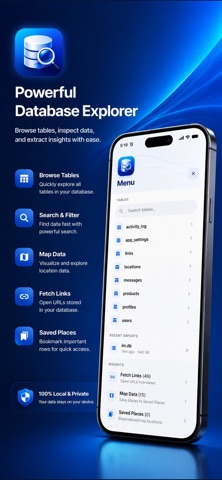
SQLite Extractor is a professional mobile tool for inspecting SQLite database files on your iPhone or iPad. Import .db, .sqlite, WAL files, or ZIP archives and explore your data with a clean, focused interface — without sending anything to the cloud. IMPORT & INSPECT • Open SQLite database files from Files, iCloud Drive, or other apps • Support for WAL (Write-Ahead Log) recovery when a database is incomplete • Import ZIP archives containing database files • Browse every table with paginated row views and column search • Inspect individual rows in a detailed inspector panel EXTRACT INSIGHTS • Automatically find URLs and web links stored in your tables • Discover map coordinates and location data embedded in cells or JSON • Parse JSON payloads from profile and settings columns • Open extracted links and locations in Safari or Maps with one tap • Save and bookmark map locations for quick reference SQL TERMINAL • Run custom SELECT queries against open databases • View query results in a structured table • Built-in sample queries to get started quickly TRY BEFORE YOU IMPORT • Explore every feature instantly with the bundled sample database • No account required — tap "Try sample database" on the home screen PRIVACY FIRST • All processing happens locally on your device • No analytics, ads, accounts, or tracking • Imported files are stored temporarily and removed when you close the database • Full privacy policy available in-app under About & Privacy WHO IT'S FOR Developers debugging local databases, IT professionals inspecting app data, researchers working with SQLite exports, and anyone who needs to understand what's inside a SQLite file on mobile. Use SQLite Extractor only with data you own or have explicit permission to inspect.
Audience growth
Ratings growth
Baseline captured. Growth appears after the crawler observes a changed rating count.
Momentum comes from crawler snapshots for the tracked storefront. “Viral growth signal” means unusually fast recent rating gains; it is an indicator, not download data.
Price tracking
Price intelligence
First snapshot captured. The trend line starts after the next crawler price observation.
- First observed Sep 4, 2026 · 5:19 AM Free
Screenshots