About this app
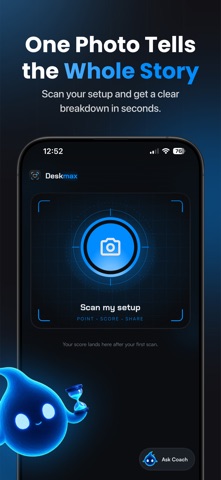
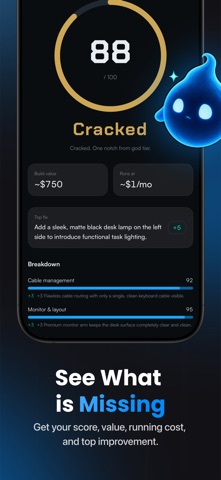
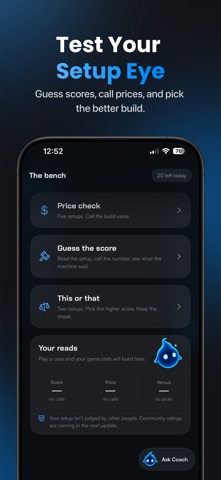
Scan your desk, gaming, or study setup and get an honest score out of 100. Deskmax rates your build, estimates what it's worth, shows your monthly running cost, and tells you the one fix that levels it up and ideas how to improve it further! Point your camera. Get scored in seconds. Share the card. WHAT YOU GET • Your setup score, out of 100, judged on a real rubric • Build value: an honest estimate of what your setup is worth • Running cost: roughly what it costs you per month • Top fix: the single change that levels your setup up the most • Full breakdown: see how every part of your setup scored • Glow-up: an AI render of what your setup could look like • Coach chat: daily advice with real product picks • The bench: judge other setups, call prices, keep a streak • A share card built to be screenshotted and posted HOW IT WORKS 1. Point your camera at your desk, battlestation, or study nook 2. Deskmax scores it out of 100 in seconds 3. See your build value, running cost, and the one fix that matters 4. Share your score card and challenge your friends We rate the setup, never the person. Scan yours and see where you land. DESKMAX PRO SUBSCRIPTION Deskmax Pro unlocks the full per-axis breakdown, the AI glow-up render, and daily coach chat. • Weekly: $4.99 per week • Yearly: $29.99 per year, with a 3-day free trial Payment is charged to your Apple Account at confirmation of purchase. Your subscription renews automatically at the same price unless auto-renew is turned off at least 24 hours before the end of the current period. Your account is charged for renewal within 24 hours prior to the end of the current period. You can manage or cancel your subscription in your Apple Account settings after purchase. Any unused portion of a free trial period is forfeited when you purchase a subscription. Terms of Use (EULA): https://www.apple.com/legal/internet-services/itunes/dev/stdeula/ Privacy Policy: https://deskmax.app/privacy
Latest release
What’s New
• Settings tidied up: account, privacy and support are easier to find, and the sign-in screens now look like the rest of the app • The camera tells you when a shot fails to capture, instead of nothing happening • Product links open the moment you tap them • Pro stays Pro when you come back to the app after a while away • Fewer stuck sign-ins on a fresh install • Clearer crash reports behind the scenes, so the next bug gets fixed faster
Audience growth
Ratings growth
Baseline captured. Growth appears after the crawler observes a changed rating count.
Momentum comes from crawler snapshots for the tracked storefront. “Viral growth signal” means unusually fast recent rating gains; it is an indicator, not download data.
Price tracking
Price intelligence
First snapshot captured. The trend line starts after the next crawler price observation.
- First observed Aug 19, 2026 · 4:21 PM Free
Screenshots