About this app
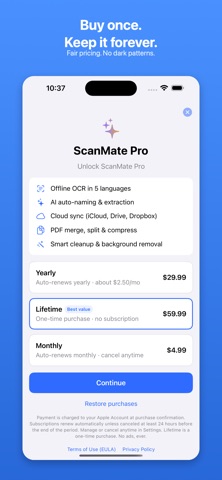
ScanMate turns your iPhone into a fast, private document scanner — without the ads, watermarks, and subscription traps you're tired of. FREE, FOREVER • Unlimited scans — no daily limits • No watermark on any export • No ads, anywhere • Automatic edge detection and perfect crops • Manual crop with a magnifier for precision • Multi-page and batch scanning • Instant enhancement and filters (Auto, Grayscale, B&W, Color) • Export to PDF, JPG, or PNG • Share via AirDrop, Mail, Messages, or Files • Folders, tags, search, favorites, and recents SCANMATE PRO • Offline OCR in English, Arabic, Bengali, Hindi, and Urdu • Search inside your documents • AI auto-naming and document classification • Receipt, invoice, and business-card extraction (save cards to Contacts) • Smart cleanup and background removal • PDF tools: merge, split, reorder, and compress • Cloud sync via your own iCloud — plus export to Google Drive, Dropbox, and OneDrive • Unlimited private folders with Face ID PRIVATE BY DESIGN Everything runs on your iPhone. Scans and OCR never touch our servers. Sync uses your own iCloud account — we never see your documents. HONEST PRICING • A genuinely useful free tier that stays free • One fair yearly plan, or buy Pro once with Lifetime • No fake countdowns, no surprise trial charges, no dark patterns • Cancel anytime from Settings WHY PEOPLE SWITCH TO SCANMATE • No ads — ever • No watermarks — ever • On-device and private • Fast, sub-second processing • Buy once, keep forever with Lifetime • Real human support, 24-hour response Built for students, small businesses, freelancers, accountants, lawyers, real estate agents, teachers, and parents. Scan a receipt, a contract, a whiteboard, or a stack of notes — and get a clean, professional PDF in seconds. Download ScanMate and scan with confidence. — Questions or feedback? Email support@scanmate.app — a real person answers. Terms of Use (EULA): https://www.apple.com/legal/internet-services/itunes/dev/stdeula/ Privacy Policy: https://jigsawlab.com/scanmate/privacy.html
Latest release
What’s New
Welcome to ScanMate 1.0 — the honest document scanner. No ads, no watermarks, no dark patterns. • Fast scanning with automatic edge detection and manual crop (with a magnifier) • Multi-page & batch scanning, perspective correction, and one-tap enhancement • Sign, annotate & mark up pages; add pages to any document • Offline OCR in English, Arabic, Bengali, Hindi & Urdu — searchable PDFs • AI auto-naming plus receipt, invoice & business-card extraction (save cards to Contacts) • Smart cleanup & background removal • PDF tools: merge, split, reorder, compress • Export to PDF/JPG/PNG; share or save to Files, Google Drive, Dropbox & more • Share to ScanMate from any app • iCloud sync, Face ID lock & private folders • Folders, tags, search, favorites, bulk actions & Trash Everything runs on your iPhone. Your documents stay yours. Questions? Send feedback right from Settings — a real person replies.
Audience growth
Ratings growth
Baseline captured. Growth appears after the crawler observes a changed rating count.
Momentum comes from crawler snapshots for the tracked storefront. “Viral growth signal” means unusually fast recent rating gains; it is an indicator, not download data.
Price tracking
Price intelligence
First snapshot captured. The trend line starts after the next crawler price observation.
- First observed Aug 16, 2026 · 10:13 PM Free
Screenshots