About this app
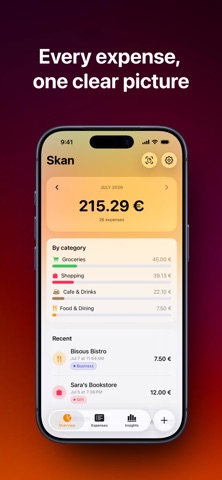
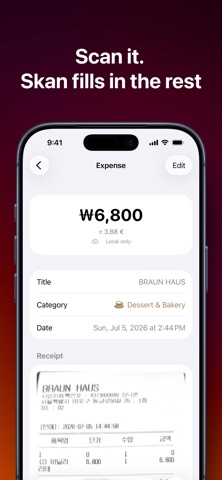
Skan is a straightforward expense tracker for people who spend in more than one currency — travelers, expats, or anyone who just wants a clear picture of where their money goes. Add an expense by typing an amount, scanning a receipt, or describing it in plain words: "42 euros, dinner with friends" becomes a logged expense in seconds. Point Visual Intelligence at a receipt from anywhere in iOS and it hands straight off to a prefilled entry — merchant, amount, currency, date and category filled in for you. Everything runs on your device, and if your iPhone doesn't support Apple Intelligence, scanning still works with built-in text recognition. Ask about your spending in plain language — "how much did I spend on coffee last month?" — and get an answer calculated from your real expenses, never guessed. You can also add an expense by voice through Siri and Shortcuts. Traveling? Turn on Travel Mode, set a trip currency, and new expenses default to it while your totals stay accurate in your home currency. Tap any amount to flip between what you paid, your home currency, and any trip currency active that month. Insights gives you a monthly recap written in your own language, plus cards for category breakdowns, spending trends, and an "at this rate" projection for the month ahead. Tap into any card for a full page with Day / Week / Month / All views and scrollable charts. A few more things Skan does well: – Batch-scan a stack of receipts, or import a multi-page PDF, and review them all before saving – Quietly flags a receipt that looks like one you've already added, before you add it twice – Track how you paid for each expense, with your own list of payment methods – Budgets by month, week, year, or category, with over-budget warnings – A home screen widget and Live Activity, so your budget is always one glance away – CSV and JSON export, plus local backups — your data is always yours to take with you Your expenses sync privately across your devices with iCloud. Skan has no ads, no trackers, and nothing to sign up for.
Latest release
What’s New
Here's what's new in Skan Budgets Type your monthly budget straight on its row, no sheet, no Save button. Clear the field to remove it. Category limits still open their dial. Insights Editing your cards is smoother: the list no longer jumps, rearranging doesn't rebuild the whole page, and search doesn't stutter. Backups & Import Backups now cover everything, tags, trips, payment methods, and anything in your Trash, so restoring never quietly loses data. You can also import a whole backup folder from Files and choose to merge or replace, or bring in a CSV with proper currencies, times, and bulk tagging. Filters Filter by trip, amount, or receipt status, select multiple categories, tags, or payment methods at once, and pick from new date ranges like Last 90 Days and Last Year. Faster and more polished A new app icon, quicker expense list scrolling, and a clearer look for over-budget categories. Scanning a receipt now shows its progress right in the form. Thanks for using Skan!
Audience growth
Ratings growth
Baseline captured. Growth appears after the crawler observes a changed rating count.
Momentum comes from crawler snapshots for the tracked storefront. “Viral growth signal” means unusually fast recent rating gains; it is an indicator, not download data.
Price tracking
Price intelligence
First snapshot captured. The trend line starts after the next crawler price observation.
- First observed Sep 8, 2026 · 4:46 AM Free
Screenshots