About this app
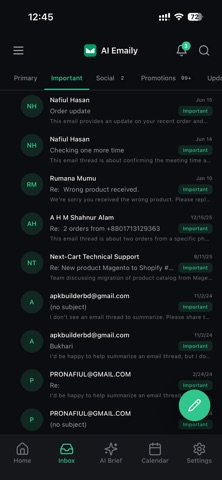
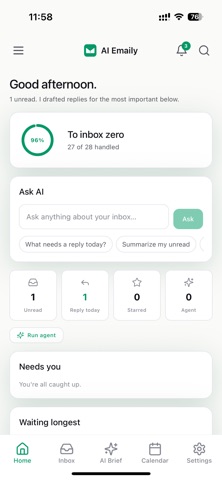
AI Emaily is an AI-native email client that acts as a chief-of-staff for your inbox. It triages, drafts in your voice, extracts calendar events, and surfaces what matters — while keeping you in control of every send. Connect Gmail, Outlook, or any IMAP account. Works across iPhone, iPad, web, and Mac. YOUR AI ASSISTANT, THREE WAYS TO WORK Manual — AI suggests. You act on everything at your own pace. Copilot — AI drafts replies you review and approve before anything sends. Nothing leaves your outbox without your tap. Autopilot — AI handles routine mail with a full audit trail and one-tap undo. Gated and off by default. EVERY MORNING: AI BRIEF Start the day with a digest of what needs your attention. Drafted replies are waiting for each item — read the AI summary, edit if you want, then tap Send. You stay in the loop; the inbox moves on its own. DRAFT IN YOUR VOICE AI replies match your tone, length, and phrasing from a voice profile you build over time. Short, direct, formal, or warm — the draft sounds like you wrote it. ASK YOUR INBOX Type a question in plain English: "What did the team say about the Q3 launch?" The app searches by meaning, not just keywords, across your full thread history. TRIAGE AND ORGANIZE AI auto-tags incoming mail and sorts it into categories. Build inbox rules in plain language — "Mark anything from my bank as important and skip the inbox" — and AI converts it to a rule instantly. CALENDAR AND CONTACTS AI reads event details out of email threads and offers to add them to your calendar. Contacts are built automatically from your correspondence, with full history, notes, and VIP flagging. MORE FEATURES Semantic search across all your mail Thread summaries for long conversations Snooze any thread to a time that suits you Reminders to follow up Labels, filters, and folder views Dark mode and compact density 20 languages including Arabic, Hebrew, Japanese, and Hindi In-app notification center YOUR PRIVACY AI Emaily is built on the principle that your email is yours alone. - Your mail is never used to train AI models - Model providers retain zero data after processing - OAuth connects via the system browser — your password never touches the app - AI actions require your approval before sending in Copilot mode - Biometric lock protects access on your device - OAuth tokens and account credentials are encrypted at rest, never logged CONNECT YOUR ACCOUNTS Gmail (Google OAuth), Outlook (Microsoft OAuth), and any standard IMAP account including iCloud Mail, Fastmail, Yahoo, Zoho, and GMX. https://aiemaily.com/legal/privacy https://aiemaily.com/legal/terms
Latest release
What’s New
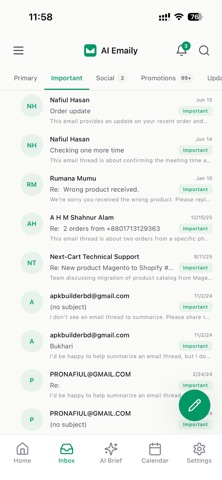
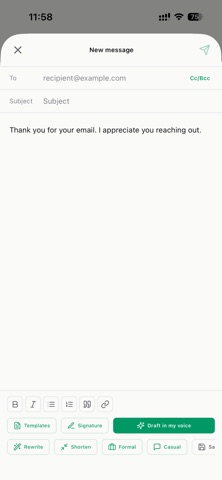
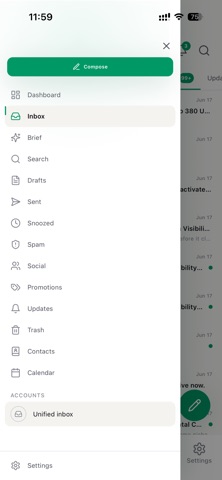
A major update — a fresh new design, faster inbox, and quicker ways to sign in. WHAT'S NEW • Sign in faster. Continue with Google or Sign in with Apple — alongside your usual email login. • Brand-new look. A brighter, more modern design with soft floating cards, cleaner type, and beautifully refined Light and Dark modes. • Redesigned email view. Emails now render perfectly and fit your screen — no more cut-off newsletters. Images show automatically, and a new floating glass action bar keeps Reply, AI Draft, and quick actions right under your thumb. • Gmail-style sender avatars. Recognizable brand logos and colorful monograms make your inbox far easier to scan at a glance. • Smarter sidebar. One tap to Labels, AI Drafts, your Team inbox, Cold Email, and every folder — each with live unread counts. • New dashboard. "Needs you" is front and center, plus a full-width triage overview you can filter by Today, Yesterday, 7 Days, or 30 Days. • Faster compose. A single streamlined toolbar and 12 ready-to-use templates so you can reply in seconds. • Tighter, quicker inbox. Denser rows, smoother swipe actions, and snappier scrolling. • Better notifications. Tap a notification and land right on that email — and the inbox always opens at the newest mail. • Polished everywhere. A new app icon, refreshed launch screen, and countless small fixes and refinements. Thanks for using AI Emaily. We're just getting started — your feedback is always welcome.
Audience growth
Ratings growth
Baseline captured. Growth appears after the crawler observes a changed rating count.
Momentum comes from crawler snapshots for the tracked storefront. “Viral growth signal” means unusually fast recent rating gains; it is an indicator, not download data.
Price tracking
Price intelligence
First snapshot captured. The trend line starts after the next crawler price observation.
- First observed Aug 6, 2026 · 5:22 PM Free
Screenshots