About this app
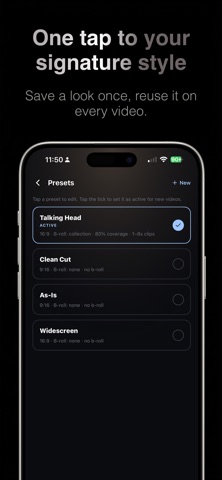
Record your clip. Wavcut edits it for you: it cuts the silent pauses, adds captions, and fills the gaps with extra footage from your own library. Done in about a minute, right on your iPhone. WHAT IT DOES - Places your extra footage (b-roll) over the talking parts, so every video looks produced. - Saves your style as a preset. One tap, and every new video gets the same look. - Cuts dead air automatically so your video keeps moving. - Adds clean captions people can read with the sound off. - Works 100% on-device. Your footage never leaves your phone unless you back it up. MADE FOR SHORT-FORM Built for Reels, TikTok, and Shorts in vertical 9:16, plus 4:5, 1:1, and 16:9. Export in HD or 4K and share straight to your favorite app. YOUR CLIP LIBRARY Organize your extra footage into collections and reuse it in any project. Free accounts keep clips on your phone; paid plans back them up and sync across devices. FREE FOREVER Editing, silence cutting, and exporting are free with no time limit. Almost everything in the app works on the free plan. Paid plans add extras: AI captions, cloud backup for your clips, and watermark-free HD exports. You never have to pay to keep editing. SUBSCRIPTIONS Pro and Max are optional monthly or yearly subscriptions. Payment is charged to your Apple ID. Subscriptions renew automatically unless canceled at least 24 hours before the end of the period. Manage or cancel anytime in your App Store account settings. Terms of Use (EULA): https://wavcut.com/terms
Latest release
What’s New
Animated captions: choose Karaoke, Pop, Reveal, or Bounce, and see each one animate before you pick. AI captions now support 60+ languages, including Polish, Thai, Vietnamese, Ukrainian, Tamil and Hebrew. Cloud backup is now per clip. Keep footage on your phone, back up only what you want, and pull anything back down at any time. New clips stay on your device by default — you decide what gets uploaded. Clearer caption controls, split into Font, Style and Animation. Fixes: b-roll clips saved to your device now show up in the editor and get placed automatically.
Audience growth
Ratings growth
Baseline captured. Growth appears after the crawler observes a changed rating count.
Momentum comes from crawler snapshots for the tracked storefront. “Viral growth signal” means unusually fast recent rating gains; it is an indicator, not download data.
Price tracking
Price intelligence
First snapshot captured. The trend line starts after the next crawler price observation.
- First observed Sep 9, 2026 · 4:39 AM Free
Screenshots