About this app
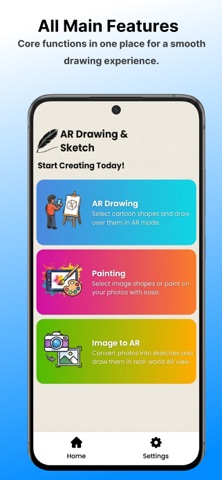
AR Sketch: Draw & Paint – Learn, Trace & Create Amazing Artwork Bring your creativity to life with AR Sketch: Draw & Paint. Whether you’re just starting your drawing journey or looking to improve your artistic skills, this app combines Augmented Reality (AR) tracing, photo-to-sketch conversion, and creative drawing tools to make sketching simple and enjoyable. Using your device’s camera, you can project drawing guides onto paper, trace with confidence, and practice anytime, anywhere. Features AR Sketch & Tracing Project drawing guides onto real-world surfaces using Augmented Reality and trace them with ease. Perfect for practicing, learning, and creating detailed artwork. Image to Sketch Convert your favorite photos into clean sketch outlines that can be used as drawing references or tracing templates. Drawing Categories Discover a variety of drawing templates, including: • Anime • Animals • Cars • Bikes • Cartoon Characters • Dolls • Superheroes • Nature • Flowers • Portraits Painting & Drawing Tools Create, sketch, and paint with easy-to-use tools designed for artists of all skill levels. Learn to Draw Build confidence and improve your drawing accuracy through guided tracing and regular practice. Draw Anywhere Practice your creativity at home, school, in the studio, or wherever inspiration strikes. How It Works 1. Choose a drawing template or import a photo. 2. Convert the image into a sketch outline (optional). 3. Place a sheet of paper on a flat surface. 4. Use AR mode to align the drawing guide. 5. Trace and create your artwork. Perfect For • Beginners learning to draw • Students and hobby artists • Sketching and tracing practice • Creative art projects • Anime and cartoon drawing enthusiasts Why Choose AR Sketch: Draw & Paint? • Real-time AR tracing guidance • Photo-to-sketch conversion • Painting and drawing tools • Multiple drawing categories • Simple and beginner-friendly interface • Regular content updates Download AR Sketch: Draw & Paint today and start creating beautiful sketches, paintings, and artwork with the power of Augmented Reality.
Latest release
What’s New
Change App Icon
Audience growth
Ratings growth
Baseline captured. Growth appears after the crawler observes a changed rating count.
Momentum comes from crawler snapshots for the tracked storefront. “Viral growth signal” means unusually fast recent rating gains; it is an indicator, not download data.
Price tracking
Price intelligence
First snapshot captured. The trend line starts after the next crawler price observation.
- First observed Sep 4, 2026 · 1:46 AM Free
Screenshots