About this app
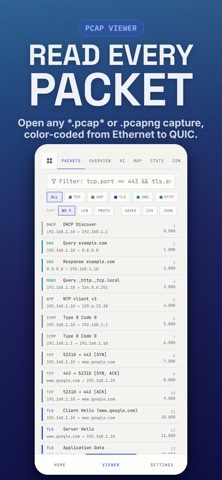
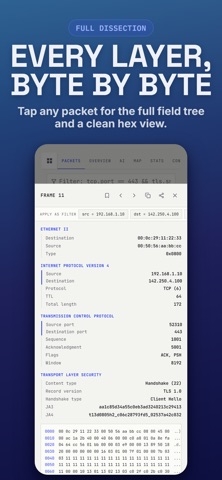
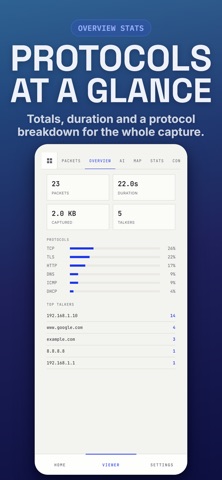
PCAP Analyzer opens and analyzes .pcap and .pcapng network captures right on your iPhone, iPad, and Mac, with no desktop required. Troubleshoot a flaky connection, investigate a security incident, or learn how networks really work, with a fast, deep, and clear packet analyzer in your pocket. Open captures created by tcpdump, tshark, and any standard pcap or pcapng tool, and read the wire like a page. DEEP PROTOCOL DECODING Every frame is dissected down to the field: Ethernet and VLAN, IPv4, IPv6, TCP, UDP, ICMP, ICMPv6, IGMP, ARP, DNS, mDNS, LLMNR, DHCP, HTTP, HTTP/2, TLS, DTLS, QUIC, SMB2, SNMP, NTP, RADIUS, TFTP, MQTT, SCTP, GRE, ESP, and NetFlow/IPFIX. A clean, tappable detail tree and a full hex view show every byte. TLS FINGERPRINTING, JA3 AND JA4 PCAP Analyzer computes JA3 and JA4 client fingerprints natively, and even decrypts QUIC Initial packets to recover the SNI and fingerprints, analysis that usually needs desktop plugins. FIND THE PROBLEM FAST • Color coded packets, so retransmissions, resets, errors, and stalls stand out • Expert diagnostics: TCP retransmissions, duplicate ACKs, zero window stalls, connection resets, HTTP errors, and DNS failures • Threat detection: port and host scans, suspicious C2 and backdoor ports, possible DNS tunneling, and cleartext credentials POWERFUL DISPLAY FILTER A real, field aware filter language with autocomplete and saved filters: tcp.port == 443, tls.sni contains "example", tcp.analysis.zero_window, dns or http. Tap any field in a packet to filter by it instantly. STATISTICS AND VISUALS Conversations, Endpoints, Protocol Hierarchy, a network topology map, an I/O graph, Follow Stream with a TCP sequence and time graph, and automatic name resolution, so you see hostnames instead of raw IP addresses. ON-DEVICE AI On supported iPhones with Apple Intelligence, an on device model summarizes a capture in plain language and turns plain English requests into filters, like "show failed connections". It runs entirely on your device, and your capture never leaves your phone. BUILT FOR BIG CAPTURES A native streaming engine opens very large captures without running out of memory, files that crash other mobile viewers. PRIVATE BY DESIGN Everything happens on your device. PCAP Analyzer reads saved files only, captures no live traffic, needs no special permissions, and never uploads your data. Privacy Policy: https://rush.tools/privacy Terms of Use: https://rush.tools/terms
Latest release
What’s New
Fixed stability issues and performance regressions in our PCAP analyzer app. Improved packet decoding and overall file processing performance. General performance enhancements and bug fixes.
Audience growth
Ratings growth
Baseline captured. Growth appears after the crawler observes a changed rating count.
Momentum comes from crawler snapshots for the tracked storefront. “Viral growth signal” means unusually fast recent rating gains; it is an indicator, not download data.
Price tracking
Price intelligence
First snapshot captured. The trend line starts after the next crawler price observation.
- First observed Aug 9, 2026 · 12:14 AM Free
Screenshots