About this app
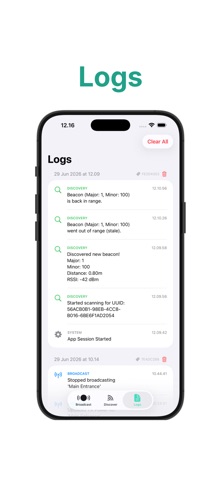
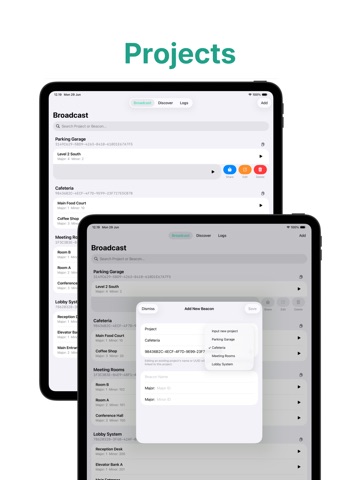
Your Beacon Simulator is a powerful, multi-platform developer utility designed to simulate, broadcast, and discover virtual beacons. Built entirely in modern SwiftUI, it eliminates the need for physical hardware when testing location-based applications, indoor navigation systems, or proximity triggers. Whether you are configuring virtual beacons on the go or managing complex proximity layouts from your desk, the app leverages your device's native Bluetooth stack to deliver a seamless, hardware-free testing environment. KEY FEATURES • Virtual Beacon Broadcasting Group multiple configurations under a single Proximity UUID. Enjoy full control over Major/Minor IDs and calibrate Measured TX Power on the fly. Export and share your configurations instantly. • Advanced Discovery & Scanning Target specific Proximity UUIDs to actively scan your environment. The real-time dashboard categorizes signals (Immediate, Near, Far, Unknown) and provides deep-dive metrics including raw RSSI, estimated distance in meters, and last-seen timestamps. • Apple Watch Companion* Control active broadcasts and discovery scans right from your wrist. Enjoy real-time state mirroring, tactical haptic feedback, and a tailored wearable UI. • Background Monitoring* Utilize CoreLocation to track UUID regions even when the app is minimized. Get rich local notifications and pinpoint the exact Major/Minor ID that triggered an event. • Session-Based Live Logging Eliminate guesswork with a real-time event ledger. Track exactly when your app initiates scanning, catches a new beacon, or marks a missing device as stale. OPEN SOURCE Proudly open-source under the AGPL-3.0 license. Find the source code, contribute, or file issues directly on my GitHub repository. *Disclaimer: The Apple Watch companion app requires a paired iPhone. Background Monitoring is available exclusively on iOS and iPadOS.
Latest release
What’s New
Sync, Solidified Version 1.1.1 tightens up iCloud sync reliability behind the scenes. We resolved an edge case that could cause sync to silently fail to connect, so your data now stays consistently in step across all your devices.
Audience growth
Ratings growth
Baseline captured. Growth appears after the crawler observes a changed rating count.
Momentum comes from crawler snapshots for the tracked storefront. “Viral growth signal” means unusually fast recent rating gains; it is an indicator, not download data.
Price tracking
Price intelligence
First snapshot captured. The trend line starts after the next crawler price observation.
- First observed Aug 21, 2026 · 12:08 AM Free
Screenshots