About this app
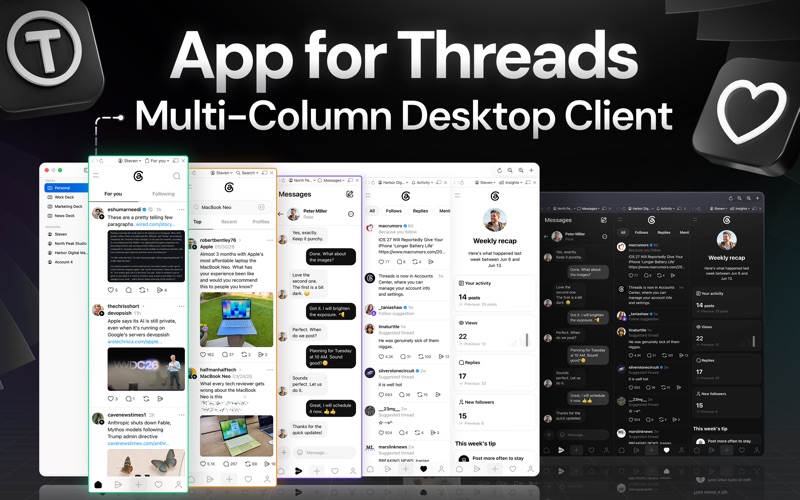
A powerful multi-column desktop client for Threads. See everything at once - multiple accounts, feeds, searches, and conversations side by side in one deck-style window. MULTI-COLUMN DECKS View several Threads pages side by side, each in its own column. Group columns into decks - saved sets of columns you can switch between instantly from the sidebar - and add, close, rename, or reorder them at any time. Columns share the window equally, or you can turn on horizontal scrolling to keep every column at a comfortable width. Your layout, pages, and zoom levels are restored every time you relaunch. MULTIPLE ACCOUNTS, FULLY ISOLATED Add as many Threads accounts as you like. Each account keeps its own completely separate login session, so there is no logging in and out. Any column can show any account, names are filled in automatically from your @username after login, and removing an account wipes its data from your Mac. FAST NAVIGATION Every column has its own back, forward, and reload controls, plus a Pages menu that jumps straight to Home, For you, Following, Search, Messages, Activity, Insights, Saved, Ghost posts, Liked, Archive, or Settings. Your own custom feeds are detected automatically and appear in the same menu. External links open in your default browser. NEW MESSAGE NOTIFICATIONS Get a macOS notification when any of your accounts receives a new DM - even accounts that aren't currently open in a column. QUICK POST FROM ANYWHERE Press Cmd+Shift+T anywhere on your Mac to open a floating compose panel. Pick which account to post as, write, attach photos or videos, and post - the panel closes itself when you're done. MENU BAR MINI-FEED A compact Threads feed lives in your menu bar, so you can check your timeline with one click without opening the main window. FLOATING WINDOWS Pop any column out into its own window, pin it always on top, and adjust its opacity - perfect for keeping an eye on a feed while you work. PER-ACCOUNT NOTEPADS Click any account in the sidebar to open its personal notes area. Each account has its own set of notepads shown side by side, and the Add Notepad button in the toolbar adds more. Draft posts, save ideas, translate notes with Apple Intelligence, polish them with Apple Writing Tools, and keep an eye on length with the built-in character counter. Everything supports undo and is saved automatically. MADE FOR THE MAC Choose Light, Dark, or System appearance, zoom each deck's pages independently, and control everything with keyboard shortcuts. Settings let you toggle the global hotkey, menu bar feed, DM notifications, horizontal scrolling, and more. PRIVACY POLICY: http://www.99mobileapp.com/pp.html TERMS: http://www.99mobileapp.com/terms/index.html DISCLAIMER This is an unofficial, third-party application and is not affiliated with, endorsed by, or sponsored by Threads or Meta. All trademarks are the property of their respective owners.
Latest release
What’s New
* Minor bug fixes.
Audience growth
Ratings growth
Baseline captured. Growth appears after the crawler observes a changed rating count.
Momentum comes from crawler snapshots for the tracked storefront. “Viral growth signal” means unusually fast recent rating gains; it is an indicator, not download data.
Price tracking
Price intelligence
First snapshot captured. The trend line starts after the next crawler price observation.
- First observed Aug 19, 2026 · 4:47 PM Free
Screenshots