About this app
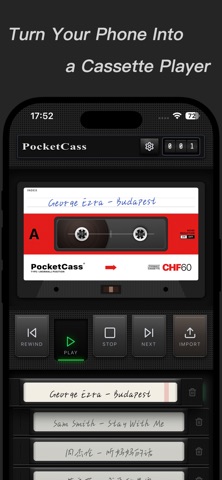
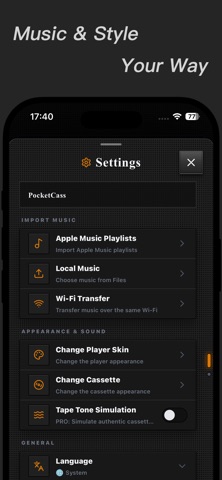
PocketCass turns your iPhone into a retro cassette player. Spinning reels, mechanical controls, and the distinct character of different tapes bring back everything that made cassette listening feel special—even in the digital age. Import local music or add Apple Music playlists to your tape library. Load a cassette and press Play. 【FEATURES】 • CASSETTE PLAYBACK, BROUGHT TO LIFE Watch the reels spin and use familiar Play, Stop, Rewind, and Next controls. • EVERY TAPE HAS ITS OWN SOUND With local music, different tape simulations recreate their own noise floor, dynamics, and frequency character. • BRING YOUR OWN MUSIC Import MP3, FLAC, WAV, and M4A files from the Files app, add Apple Music playlists, or transfer music from a computer browser over the same Wi-Fi network. • CLASSIC PLAYERS AND TAPES Switch between retro player skins and cassette designs to create a player that feels like your own. • IMMERSIVE LANDSCAPE PLAYER Turn your iPhone sideways and watch a classic cassette player come alive in full screen. • CASSETTE COLLECTION WIDGET Display your album artwork and cassette collection on the Home Screen, keeping the music you love always in sight. • MADE FOR EVERYDAY LISTENING Supports background playback, Lock Screen controls, and headphone controls. Basic playback, local import, and the standard player and cassette are free. Wi-Fi transfer, additional player skins, cassette themes, and tape sound simulation require PocketCass PRO. Apple Music playback requires an active subscription and network connection. Tape sound simulation is available for local music only. PRO is available as monthly and annual auto-renewing subscriptions or as a one-time lifetime purchase. Pricing and trial eligibility are shown on the App Store purchase screen. Terms of Use (EULA): https://www.apple.com/legal/internet-services/itunes/dev/stdeula/ Privacy Policy: https://8306603.github.io/pocketcass-site/privacy.html?lang=en
Latest release
What’s New
Added new classic cassette player skins to Theme Manager, improved performance, and fixed several bugs for a smoother, more reliable experience.
Audience growth
Ratings growth
Baseline captured. Growth appears after the crawler observes a changed rating count.
Momentum comes from crawler snapshots for the tracked storefront. “Viral growth signal” means unusually fast recent rating gains; it is an indicator, not download data.
Price tracking
Price intelligence
First snapshot captured. The trend line starts after the next crawler price observation.
- First observed Sep 11, 2026 · 4:25 PM Free
Screenshots