About this app
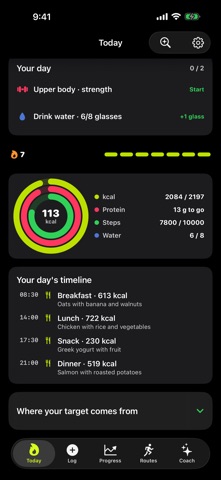
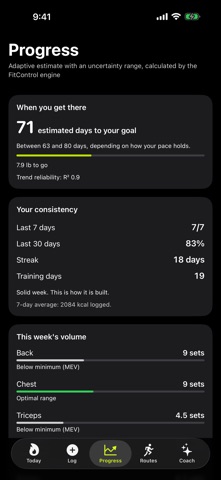
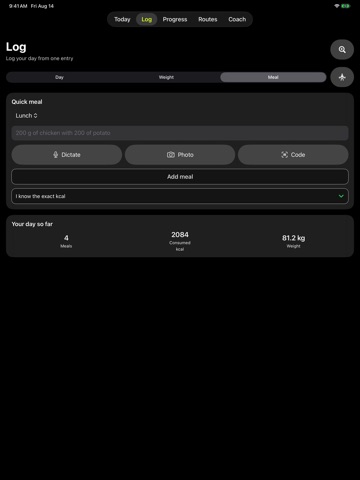
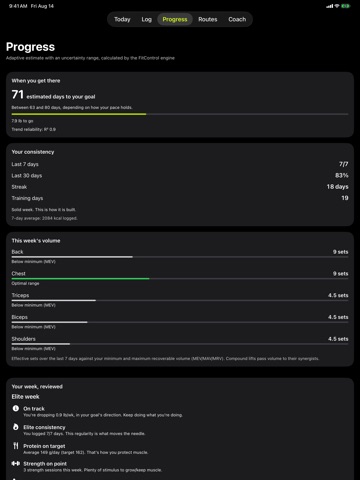
Log food, weight, strength and cardio in one diary. FitControl works out your macros and estimates your energy expenditure from your own logs. When there is enough data, it shows an uncertainty range so you can read that estimate for what it is. TALK TO YOUR COACH • Tell it what you ate or trained and it logs it; ask what is left to close your day and it answers. • On an iPhone with Apple Intelligence it reasons on the device itself, with no quota and without needing an account. If your iPhone does not support it, you can use it by signing in. • Open it from the Action button or Control Centre. With headphones you can interrupt it while it is speaking. LOGGING AND PROGRESS • Nutrition: describe what you ate in a sentence — "chicken with rice and a banana" — and the app reads it on the device, offline. You can also scan barcodes, import a plan, or ask for an estimate from a photo of your plate; that one uses cloud AI and asks your permission first. • Goals: built on published formulas such as Mifflin-St Jeor and Katch-McArdle, and it shows where each estimate comes from. • Body: Navy or caliper estimates, a progress gallery and an indicative projection with its margin. Body photos do not calculate composition. TRAINING AND ROUTES • Strength: log sessions, check PRs and estimated 1RM, build routines and mesocycles, and use camera VBT on supported devices. VBT analysis is processed on the device. • Cardio: log sessions and, with your permission, read steps and other compatible Health data. You can also turn on prospective import of new compatible workouts and their GPS routes; importing them does not publish them or send them to remote services. • Routes: record GPS with map, pace, elevation and splits; you can use a compatible Bluetooth strap to see your heart rate. When sharing a route, you can apply the private zone trim. • 3D flyover: turn a route into an aerial film. The video is created on your iPhone and FitControl does not upload your track to its servers; the satellite imagery is provided by Apple Maps. Includes 1 flyover a month; with Pro, 5. APPLE WATCH • From the wrist: the daily verdict, food by dictation, the strength session with the rest between sets timed, your week, and GPS route tracking. • Complications for your watch face, and its own queue: whatever you log without the iPhone nearby is sent when the connection returns. FIND WHAT YOU NEED • Explore: a catalogue of everything the app can do. • FitControl's tools show up in iOS search. DATA AND ACCOUNT • The diary and the essential calculations are stored on the device and can be used without creating an account. • With an account you can sync data between devices over HTTPS/TLS. Sync is not end-to-end encrypted. • Before any cloud AI feature, the app names the data categories it may send and asks for your permission. • Sync, maps and cloud AI need a connection; some features also need an account or system permissions. • In Settings you can export a local backup, protect it with a password and request account deletion. • This version does not include third-party advertising. FITCONTROL PRO (OPTIONAL SUBSCRIPTION) Pro raises the allowance for the 3D flyover, photo-based meal analysis and qualitative visual progress review; it also adds reports and training tools. The price, the period and any eligible offer are shown with App Store information before you confirm. You can restore purchases and open subscription management from the app. Estimates are indicative and do not replace professional medical or nutritional advice. Terms: https://fitcontrol.co/terminos/ Privacy: https://fitcontrol.co/privacidad/
Latest release
What’s New
TALK TO YOUR COACH Now you can talk to it: tell it what you ate or trained and it logs it, ask what is left and it answers. On an iPhone with Apple Intelligence it reasons on the device itself, with no quota and without needing an account. • Open it from the Action button or Control Centre. • With headphones you can interrupt it while it is speaking. YOUR ROUTE, IN 3D Turn any route into an aerial film. The video is created on your iPhone and FitControl does not upload your track to its servers; the satellite imagery is provided by Apple Maps. Includes 1 flyover a month; with Pro, 5. LOGGING, IN WORDS No more calorie wheel: describe your meal in a sentence and the app reads it on the device, offline. Every suggestion is reviewed before it is saved. FIND WHAT YOU NEED • Explore: a catalogue of everything the app can do. • FitControl's tools show up in iOS search. ALSO • Revised interface: Today, Training, Progress and Body share the same header, date row and geometry. • Fixed dates on non-Gregorian calendars and in regions with non-Latin digits.
Audience growth
Ratings growth
Baseline captured. Growth appears after the crawler observes a changed rating count.
Momentum comes from crawler snapshots for the tracked storefront. “Viral growth signal” means unusually fast recent rating gains; it is an indicator, not download data.
Price tracking
Price intelligence
First snapshot captured. The trend line starts after the next crawler price observation.
- First observed Aug 19, 2026 · 5:55 PM Free
Screenshots