About this app
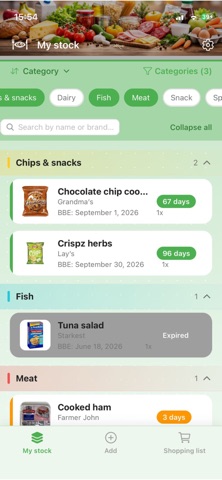
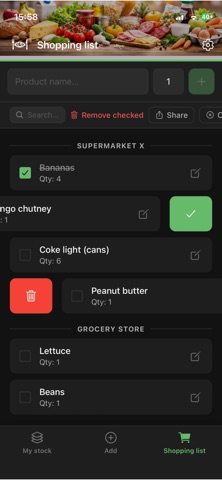
Throwing away food because you forgot the expiry date? Stop wasting money and food. Stoqi is your free food expiry tracker and pantry inventory app that monitors best-before and expiration dates, sends timely reminders, and keeps your grocery list organized, all in one place. PANTRY & FOOD INVENTORY MANAGEMENT • Track products with expiry date, quantity and photo • Scan barcodes or QR codes to add products instantly • Get notified before products expire, never miss a best-before date again • Organize by category: dairy, meat, frozen, drinks, and more • Add multiple expiry dates for products with different batches HOUSEHOLD SYNC • Sync your pantry inventory across all devices in your household in real time • Optionally sync your grocery list so everyone sees the latest changes • Join with a simple invite code, no account required SMART GROCERY LIST & SHOPPING PLANNER • Add items with one tap or directly from your pantry • Check off items while shopping • Organize per store when you shop at multiple locations EXPIRY DATE REMINDERS • Set reminders for short shelf life, normal and long-lasting products • Choose your preferred notification time • Works for any product: food, medicine, cosmetics and more WHY STOQI? • Private, lightweight pantry app, no account required, your data stays on your device • Works fully offline. Sync updates automatically when back online • Available in 8 languages: English, Dutch, German, French, Italian, Spanish, Portuguese and Polish • Clean interface with light and dark mode Stoqi: your food expiry tracker, pantry manager and grocery list in one app. Reduce waste, buy smart.
Latest release
What’s New
Version 2.0: Household Sync The biggest update yet: sync your pantry inventory across all devices in your household in real time. INVENTORY SYNC • Your pantry stays in sync on all household devices, automatically • Add, edit, or delete a product on one phone and see it instantly on another • Works across iOS and Android GROCERY LIST SYNC (optional) • Share your grocery list with everyone in your household • See items added or checked off instantly, across devices • Toggle shopping list sync on or off in Settings → Household HOW IT WORKS • Go to Settings → Household, create a household or join one with an invite code • No account needed, everything stays private and local-first ALSO IN THIS UPDATE • Improved dark mode styling throughout the app • Smarter category filter on the inventory screen • Duplicate add protection in the grocery list • Swipe-to-delete cleans up correctly across all list layouts • Photo permission error now shows the correct message • Notifications are correctly rescheduled when you edit a product's expiry date • Various smaller fixes and polish
Audience growth
Ratings growth
Baseline captured. Growth appears after the crawler observes a changed rating count.
Momentum comes from crawler snapshots for the tracked storefront. “Viral growth signal” means unusually fast recent rating gains; it is an indicator, not download data.
Price tracking
Price intelligence
First snapshot captured. The trend line starts after the next crawler price observation.
- First observed Aug 21, 2026 · 1:53 AM $0.99
Screenshots