About this app
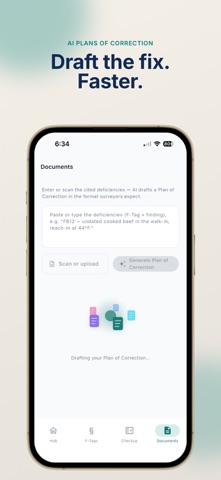
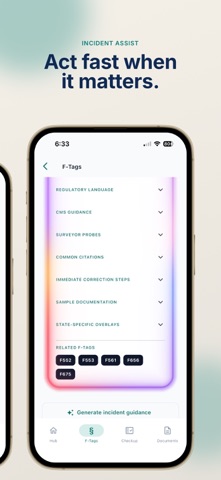
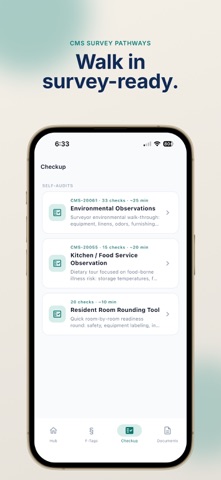
SNF Compliance Hub is the survey-readiness toolkit for skilled nursing facility teams — Administrators, Directors of Nursing, MDS coordinators, and QAPI leads. Look up any F-Tag, run a self-audit, draft a Plan of Correction, and get instant guidance on a resident incident, all in one place, put away your Watermelon Book! FIND ANY F-TAG, IN PLAIN LANGUAGE Search the full library of federal F-Tags by number or topic (e.g. "F758" or "psychotropic"). Each tag breaks down the regulatory language, CMS guidance, what surveyors actually look for, common citations, immediate correction steps, sample documentation, and state-specific overlays — in plain language your whole team can use. RUN A CHECKUP (SELF-AUDIT) Walk through structured self-audits before the surveyors do. Answer Yes / No / N/A, attach notes and photos as you go, and get a clear deficiencies summary so you know exactly where to focus. DRAFT A PLAN OF CORRECTION Enter or scan your cited deficiencies — snap a photo of the 2567 or upload a PDF — and get a Plan of Correction drafted in the format surveyors expect: corrective action, identifying others affected, systemic measures, QA monitoring, responsible party, and completion target. Copy, share, or refine. INCIDENT ASSIST Describe a resident incident and get immediate actions, a documentation checklist, care-plan updates, root-cause investigation prompts, potential surveyor questions, and related F-Tags in seconds. KNOW YOUR FACILITY See your facility's CMS Care Compare snapshot — overall star rating, health-inspection, staffing, and quality-measure ratings, penalties, and special notices — pulled straight from Medicare data. PRACTICE Sharpen your team with practice scenarios drawn from real survey situations. BUILT FOR THE WAY SNF TEAMS WORK • Everything organized by F-Tag and survey area • Scan documents right from your phone • Copy and share results with your team • Backed by live CMS data SNF Compliance Hub is a preparation and drafting tool. AI-generated content can make mistakes — always review and verify against your facility's policies and the CMS State Operations Manual, Appendix PP, before relying on it. This app does not provide legal advice and is not affiliated with or endorsed by CMS or Medicare. A SNF Compliance Hub account is required to use the app. Terms of Use (EULA): https://www.apple.com/legal/internet-services/itunes/dev/stdeula/
Latest release
What’s New
Smoother sign-up, and a friendlier fit on every screen size. • Fixed a bug where tapping the emailed verification code could clear the field instead of filling it in. • Onboarding now fits your screen without scrolling, and stays usable at large text sizes. • Search for your state by abbreviation - type "TX" for Texas. • Email addresses are checked as you fill the form, so you catch a typo before you submit. • Tap the tab you're already on to jump back to the top of the page. • Polish and bug fixes throughout.
Audience growth
Ratings growth
Baseline captured. Growth appears after the crawler observes a changed rating count.
Momentum comes from crawler snapshots for the tracked storefront. “Viral growth signal” means unusually fast recent rating gains; it is an indicator, not download data.
Price tracking
Price intelligence
First snapshot captured. The trend line starts after the next crawler price observation.
- First observed Aug 19, 2026 · 8:39 AM Free
Screenshots