About this app
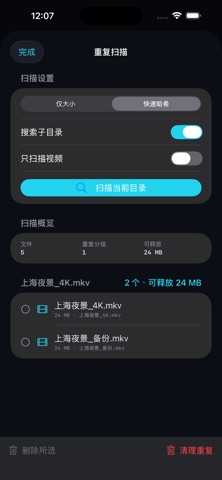
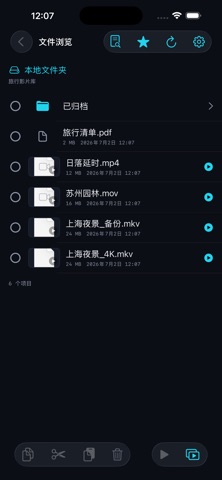
File Browser helps you browse and organize files stored on WebDAV servers, NAS devices, and local folders. It connects directly to the server you choose and performs folder listing, quick hashing, and media analysis on your device. There is no developer account to create, and your files and usage data are not uploaded to us. Browse and play • Browse WebDAV servers and authorized local folders • View folder structure, file sizes, and modification dates • Play common video formats with the system player or VLC engine • Favorite videos, resume playback, and play continuously or in random order Organize files • Copy, cut, paste, move, and delete files • Search the current folder or include all subfolders • Scan videos only or include all regular files • Review a clear confirmation before every deletion Find duplicate content • Use Size Only mode to identify possible duplicates quickly • Use Quick Hash to read small samples from the beginning, middle, and end of each candidate file • Sort results by reclaimable storage • Compare video duration, resolution, sampled frames, and audio fingerprints for additional review • Copy a Markdown scan report for your records Privacy and security • No ads, tracking, or analytics SDKs • WebDAV passwords are stored in the system Keychain • The App Store version connects only to HTTPS WebDAV servers with valid certificates • Local folders require authorization through the system file picker File Browser is designed for anyone who wants to manage a personal media library, NAS, or WebDAV storage from iPhone, iPad, or Mac.
Latest release
What’s New
Added full English support across iPhone, iPad, and Mac. File browsing, playback, duplicate scans, file actions, alerts, and privacy information now follow your system language.
Audience growth
Ratings growth
Baseline captured. Growth appears after the crawler observes a changed rating count.
Momentum comes from crawler snapshots for the tracked storefront. “Viral growth signal” means unusually fast recent rating gains; it is an indicator, not download data.
Price tracking
Price intelligence
First snapshot captured. The trend line starts after the next crawler price observation.
- First observed Aug 19, 2026 · 3:17 PM Free
Screenshots