About this app
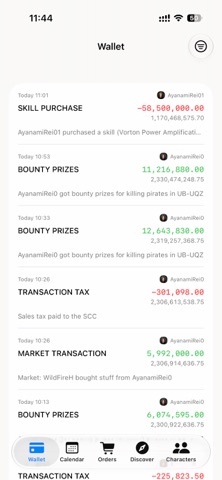
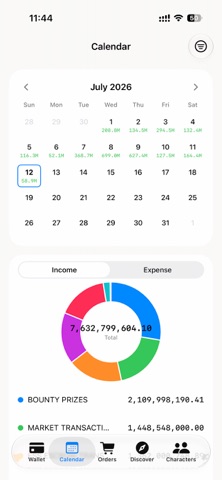
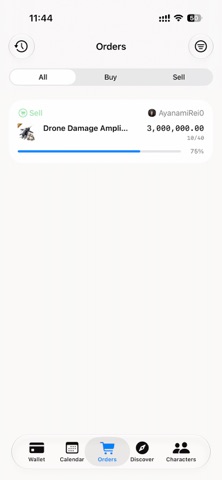
# Your EVE Universe, Always Within Reach A third-party companion app designed for EVE Online players. Whether you manage a single character or multiple accounts, the app gives you a clear and convenient way to check character information, skill training, assets, market orders, and wallet activity—all from your iPhone. ## Manage Multiple Characters Connect and manage multiple EVE Online characters in one place without repeatedly switching accounts. Quickly view character details, corporation information, current location, and other key data across all your characters. ## Track Skill Training Stay up to date with your characters’ skills and training queues. See which skill is currently training, how much time remains, and what is coming next, making it easier to plan your characters’ progression. ## View Your Assets Browse assets stored across stations, structures, and solar systems. Use categories, search, and estimated values to quickly locate ships, modules, minerals, and other items scattered throughout New Eden. ## Manage Market Orders View active buy and sell orders, including prices, remaining quantities, locations, and expiration times. Keep track of your trading activity and stay informed about the status of your market orders. ## Check Wallet Activity Review wallet balances, transactions, and journal entries in a clear and organized format. Track market purchases, sales, bounty payments, contract expenses, and other financial activity at a glance. ## Designed for iPhone Game data is reorganized and presented specifically for mobile use. Clean cards, charts, and structured data views help you understand your characters, assets, and finances even when you are away from your computer. ## Secure Authorization The app connects to your characters through the official EVE Online ESI authorization system. Your EVE Online account password is never collected or stored, and you can revoke access at any time through your EVE Online account settings. --- This application is an independently developed third-party tool and is not affiliated with, endorsed by, or officially connected to Fenris. EVE Online, EVE, and all related logos and designs are trademarks or registered trademarks of Fenris.
Audience growth
Ratings growth
Baseline captured. Growth appears after the crawler observes a changed rating count.
Momentum comes from crawler snapshots for the tracked storefront. “Viral growth signal” means unusually fast recent rating gains; it is an indicator, not download data.
Price tracking
Price intelligence
First snapshot captured. The trend line starts after the next crawler price observation.
- First observed Aug 10, 2026 · 6:19 AM Free
Screenshots