About this app
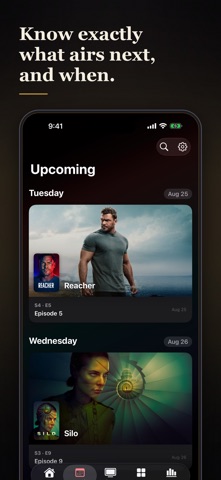
Never lose your place in a series again. How to TV tracks every show you are watching, remembers the exact episode you are up to, and tells you the moment the next one drops. What to watch next comes from your actual taste, not a generic top-10 list. Rate fast, remember everything One tap captures how a show landed (Ugh, Good, Great, or Mind Blown) and your ratings power everything else in the app. Never miss an episode See what airs next across your whole watchlist, with reminders for new episodes and for series coming back from hiatus. The Up Next widget puts your next episode on the Home Screen. Know where to stream it Streaming, rent, and buy options for every show, in your region. Show pages that connect everything Watch trailers, tap a creator to explore their other work, and jump straight to similar shows or to more from the same genre or network. Your library, organized Watchlist, In Progress, Finished, and Rated, filterable by genre and network. Browse the highest-rated series in every genre with your own ratings layered on top. Your taste, visualized A Taste Snapshot and stats that show what kind of viewer you really are. Backed up and in sync. Your ratings and progress sync privately over iCloud across your devices. No ads, no analytics SDKs, no tracking. Sign in with a free TMDb account, add the shows you love, and start rating. Free to use. From the makers of How To Movie. How to TV uses the TMDb API but is not endorsed or certified by TMDb.
Latest release
What’s New
Three fixes, and a screen that no longer stops you. Mark Watched marks the right episode. On Home, the button now always marks the episode the card is showing. Your changes no longer go missing quietly. If your TMDb session has expired, How to TV tells you instead of dropping the change. Upcoming points somewhere. Before you have added any shows, the screen now takes you to search rather than ending at a message. Faster, tidier episode lookups behind the scenes.
Audience growth
Ratings growth
Baseline captured. Growth appears after the crawler observes a changed rating count.
Momentum comes from crawler snapshots for the tracked storefront. “Viral growth signal” means unusually fast recent rating gains; it is an indicator, not download data.
Price tracking
Price intelligence
First snapshot captured. The trend line starts after the next crawler price observation.
- First observed Sep 13, 2026 · 2:48 AM Free
Screenshots