About this app
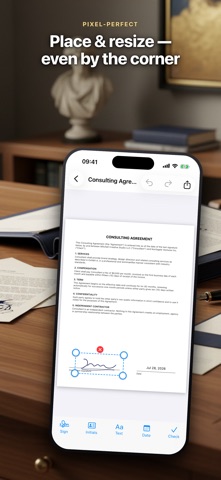
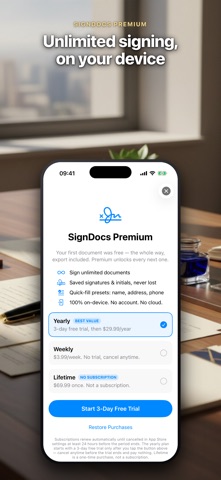
Need a signature on a contract, W-9 or lease — right now, from your phone? SignDocs opens your PDF, takes your finger-drawn signature and sends the document back in about 60 seconds. No account. No cloud. Your first document is completely free, including export. WHY SIGNDOCS IS DIFFERENT • First document free — the whole way. Fill it, sign it, export it. No surprise paywall after you have done all the work. • No account, no email, no phone number. Open the app and sign. • 100% on-device. Your contracts never leave your iPhone — the App Store privacy label says "Data Not Collected", and it is true. • Your signature cannot fall off. On export the signature is flattened — baked into the PDF itself — so it stays exactly where you put it, on any device the file is opened on. • Saved signatures and initials are stored securely in the system Keychain and survive even reinstalling the app. HOW IT WORKS 1. Open a PDF — from Mail, WhatsApp, Files or any app via Share. 2. Draw your signature with a finger or Apple Pencil, or pick a saved one. 3. Fill the form: text, dates, checkmarks, initials. 4. Export and send — the flattened PDF goes anywhere: Mail, messengers, print. WHAT YOU GET • Signature and initials drawn with a finger or Apple Pencil, in black or blue • Multiple saved signatures — reuse them with one tap • Text boxes with adjustable size — and paste from the clipboard actually works • Quick-fill presets: type your name, address, phone and email once, insert them with one tap • Date and checkmark stamps for forms • Zoom, page thumbnails, undo/redo • Import PDF, JPG or PNG; open documents from any app • Flattened export via the share sheet: Mail, messengers, Save to Files, print MADE FOR REAL PAPERWORK Contracts, agreements, invoices, W-9s, leases, permission slips, delivery forms — if it is a PDF, you can fill it and sign it. Freelancers and small businesses need it done fast, without enterprise bureaucracy. That is exactly what SignDocs is for. PRIVACY FIRST No accounts, no sign-up, no third-party analytics, no cloud of ours. Documents and signatures stay on your device. Data Not Collected — as stated on the App Store privacy label. FREE AND PREMIUM Your first document is completely free, from opening to export. Premium unlocks unlimited documents: a yearly subscription (with a free trial), a weekly plan for urgent paperwork, or a one-time lifetime purchase with no subscription at all. Exact prices are always shown in the app before you pay. Subscriptions renew automatically unless cancelled at least 24 hours before the end of the current period. Payment is charged to your Apple ID account; manage or cancel anytime in your App Store account settings. Restore Purchases always works. Open. Sign. Send. SignDocs — and the paperwork is done. Terms of Use (EULA): https://www.apple.com/legal/internet-services/itunes/dev/stdeula/ Privacy Policy: https://gdemchenko-apps-privacy.web.app/sign-documents/privacy.html
Latest release
What’s New
Fixed a problem where deleting your free document could leave you unable to start a new one. Deleting it now returns your free document, so you can begin a new one in its place. Thanks for using SignDocs.
Audience growth
Ratings growth
Baseline captured. Growth appears after the crawler observes a changed rating count.
Momentum comes from crawler snapshots for the tracked storefront. “Viral growth signal” means unusually fast recent rating gains; it is an indicator, not download data.
Price tracking
Price intelligence
First snapshot captured. The trend line starts after the next crawler price observation.
- First observed Aug 18, 2026 · 10:30 AM Free
Screenshots