About this app
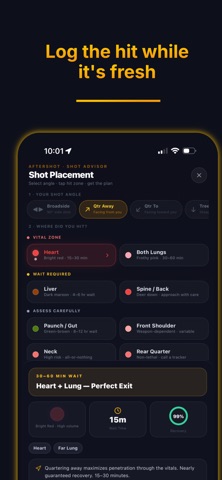
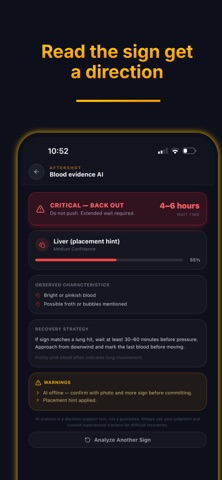
AfterShot Whitetail RecoveryHQ — Most hunting apps help you find deer and get on them. Maps, parcels, scouting, stand sites — that’s their job. AfterShot starts where those apps stop: after the shot. When a deer is hit, the clock matters. You need a place to log the hit, read the blood, walk a trail, mark sign, share your pin with the people who show up to help — and finish the recovery with a clear record of what happened. That’s what AfterShot is built for. Log the Shot Open a recovery the moment you release your arrow or fire your rifle. Capture exact shot placement, time, wind direction, and field notes while the adrenaline is high. Recovery HQ Command Center Replace blind woods navigation with systematic tracking. Recovery HQ is your live GPS command center. Plot your trail, drop evidence markers, view search rings, and see your entire team's real-time positions on one map so you never double-track the same brush. Blood Trail AI Analysis Take a photo of blood sign in the field and let AfterShot provide a hit analysis and a conservative wait-time recommendation. Objective guidance to keep you from pushing a wounded deer too early. Hunt Mode & Acoustic Detection AfterShot uses on-device acoustic detection to listen for the sound of your shot, immediately snapping the exact weather conditions and timestamp to give you a perfect baseline for your wait clock. Deep-Woods Offline Resilience Field work doesn’t wait for cell service. AfterShot features an offline-first architecture that caches your GPS paths and dropped pins locally, automatically syncing your data the moment you step back into LTE range. Bring Help When the Trail Goes Cold Coordinate with your crew, and reach certified blood-dog handlers and thermal drone pilots through the Pro Network when you need more eyes on the ground. Hunt with what you already use. Recover with AfterShot Terms of Use (EULA): https://www.aftershot.ai/terms Privacy Policy: https://www.aftershot.ai/privacy
Latest release
What’s New
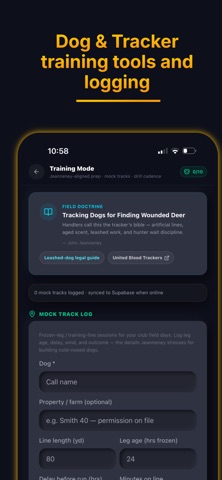
Fixed tracking bug for Dog Tracking Training module.
Audience growth
Ratings growth
Baseline captured. Growth appears after the crawler observes a changed rating count.
Momentum comes from crawler snapshots for the tracked storefront. “Viral growth signal” means unusually fast recent rating gains; it is an indicator, not download data.
Price tracking
Price intelligence
First snapshot captured. The trend line starts after the next crawler price observation.
- First observed Aug 16, 2026 · 3:05 AM Free
Screenshots