About this app
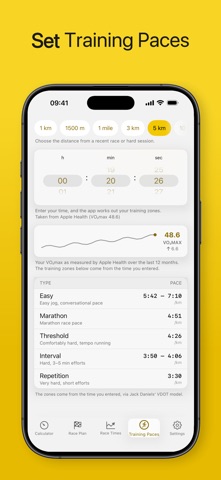
RunPace is a clean, fast pace calculator for runners who like clear numbers without the clutter. Whether you're chasing a 5K PR or pacing your first marathon, RunPace gives you the splits, predictions, and training paces you need — in seconds. CALCULATOR • Switch instantly between pace (min/km) and speed (km/h) • See finish times for every common distance, or full split tables RACE PLAN • Set a target finish time and distance, get the exact pace you need • Even-paced split tables so you know your checkpoints RACE TIMES • Enter one race result and predict your times across distances • Based on Riegel's proven formula • Or seed a starting point from your Apple Health VO₂max TRAINING PACES • VDOT-based training paces — Easy, Marathon, Threshold, Interval, Repetition • Import your VO₂max (Cardio Fitness) from Apple Health to set zones automatically • Watch your VO₂max move: a 12-month trend line with the change over the period MADE FOR RUNNERS • Kilometres or miles — switch once and the whole app follows: min/mi and mph wheels, mile splits, and a US race ladder (1 mile, 5K, 10K, 10 miles, half, marathon) • Light, dark, or system appearance • English and Norwegian • No account, no ads, no tracking — your data stays on your device Built by a runner, for runners. Lace up and find your pace.
Latest release
What’s New
A simpler calculator Pace and speed now sit side by side with an equals sign between them, and the card that repeated the same two numbers is gone. Distances and Intervals The two buttons under the wheels have clearer names, and clearer contents: Distances lists the races you might enter, Intervals a full ladder from 100 m to 10 km. Distances read the way runners say them Whole kilometres in km, shorter reps in metres: 1200 m, not 1.2 km. Split tables and interval tables both follow it. More distances to choose from 1500 m, 15 km and 30 km are new in the distance picker; custom distance has been removed. Clearer explanations The time wheel now tells you both what to enter and whether the value came from Apple Health, and if you haven't connected, it's one tap away. Riegel's formula and VDOT are explained where they're used.
Audience growth
Ratings growth
Baseline captured. Growth appears after the crawler observes a changed rating count.
Momentum comes from crawler snapshots for the tracked storefront. “Viral growth signal” means unusually fast recent rating gains; it is an indicator, not download data.
Price tracking
Price intelligence
First snapshot captured. The trend line starts after the next crawler price observation.
- First observed Sep 3, 2026 · 12:21 AM Free
Screenshots