About this app
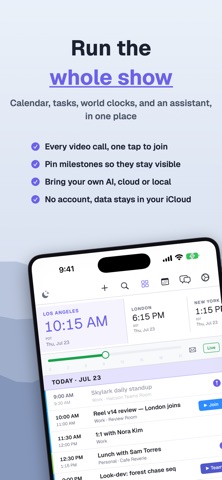
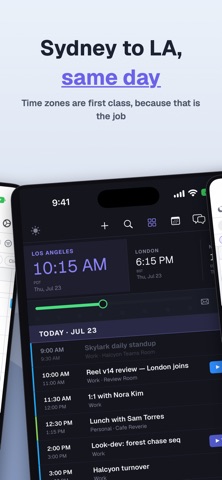
CalStack is a personal command center for your calendar, email, tasks, notes, contacts, and AI assistant. Built for people who live across meetings, travel, family schedules, projects, and inboxes, CalStack brings the day into one focused view instead of scattering it across apps. See your day, upcoming week, pinned events, meetings, reminders, and time zones in a single dashboard. Use Start Day, Check In, and Wind Down rituals to turn your calendar, email, tasks, and notes into practical daily context. CalStack also includes an AI chatbot that can work with your local app context, including calendar events, synced notes, processed email, contacts, and saved preferences. You can connect supported AI providers or local model servers depending on your setup. Key features: • Unified calendar dashboard • Day, week, month, quarter, year, and list calendar views • Pinned and starred calendar events • Time zone dashboard with time scrubber • AI-assisted Start Day, Check In, and Wind Down workflows • Email sync and searchable email context • Brain notes and memory layer • Contact tracking • Meeting and video link support • Local model support for privacy-focused workflows • iCloud sync for supported app data • Native iPhone, iPad, and Mac layouts CalStack is designed to help you understand what matters today, prepare for what is coming next, and keep useful context close without turning your day into another inbox.
Latest release
What’s New
## What's New **Meeting Alerts** Never miss a call. Events with a video call link now alert you before they start with a Join button right in the notification. Active meetings show a live badge, and on Mac the Dock icon bounces when it's time to join. Customize alert timing in **Settings → General → Meeting Alerts**. **Today Strip** Swipe right to pin events or left to delete. Short swipes reveal actions, while full swipes complete them instantly, just like Mail. **More at a Glance** Pinned events now display countdowns directly in the Today strip. Multi-day events update automatically with labels like "4 days left," "1 day left," and "Ends today." **Email Suggestions** Tap suggested events to view full details, including the source email. Dismiss suggestions instantly, or turn the feature off anytime in **Settings → Email**. **Calendar** The calendar now loads two years ahead and continues seamlessly as you navigate. Quarter view is faster, more compact, and now scrolls backward in time. The **+** button creates events on the day you're viewing, and tapping an empty day lets you add an event directly to that date. **Performance** We've made significant performance improvements throughout the app, including the dashboard, Week view, Tasks, Brain sidebar, and calendar scrolling.
Audience growth
Ratings growth
Baseline captured. Growth appears after the crawler observes a changed rating count.
Momentum comes from crawler snapshots for the tracked storefront. “Viral growth signal” means unusually fast recent rating gains; it is an indicator, not download data.
Price tracking
Price intelligence
First snapshot captured. The trend line starts after the next crawler price observation.
- First observed Aug 8, 2026 · 10:22 PM $4.99
Screenshots