About this app
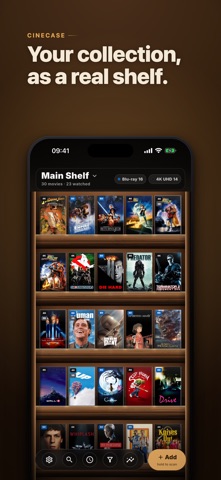
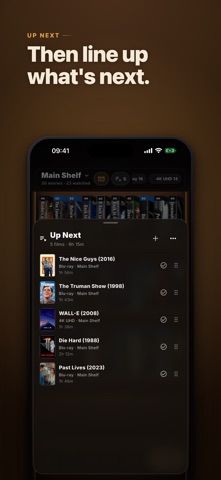
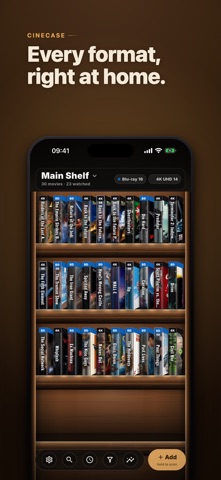
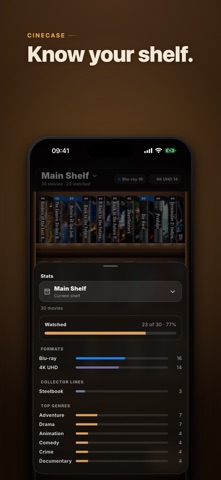
Your collection should do more than sit in a list. It is combo packs, box sets, Steelbooks, seasons, and shelves arranged your way. Most catalog apps flatten all of that into one long list. Cinecase keeps the physical collection intact, then helps you choose what to watch from the films you actually own. LET MOVIE NIGHT CHOOSE Open Movie Night when nobody can decide. Start with unwatched films, narrow by genre, runtime, watched status, actor, or director, and let Cinecase reveal one equal-odds pick from your own shelf. Films inside a Collection stay individually eligible, so the box never hides the choices inside it. LINE UP WHAT COMES NEXT Up Next is the plan you keep between movie nights. Add films from Movie Night or from a film's details, then drag them into the order you want. Every row tells you which disc to pull: format, shelf, collector line and spine, and the box set it lives in. Up Next is free; Pro adds separate queues for a marathon, the kids, or a boutique catch-up. RECORD WHAT YOU ACTUALLY OWN A Blu-ray + DVD + Digital pack is one case on your shelf, not three entries. A complete series and a single season are different things, and Cinecase keeps them different. Capture the details that make a copy yours: • Collector lines such as Criterion, Arrow, and Steelbook, plus your own publisher when the list does not cover it • Spine numbers, editions, and packaging • 4K UHD, Blu-ray, 3D, DVD, VHS, LaserDisc, and other formats • Notes, loans, ratings, and watch history ARRANGE IT THE WAY YOU WANT Drag cases into your own order and it stays that way, or let automatic sorting keep things alphabetical. Browse spines like a shelf, or switch to covers. Use your own photo for free, or choose alternate artwork with Pro. Separate 4K from Blu-ray, TV from film, or the kids' shelf from everything else. Build shelves that match how you already think, and move titles between them. (Extra shelves are Pro; the main shelf is free.) GROUP WHAT BELONGS TOGETHER Build Collections for trilogies, franchises, and box sets. A Collection sits on the shelf as the single case it really is, and opens to show the films inside. Each film keeps its own watched state and watch history. FIND ANYTHING AGAIN Search titles, actors, and directors. Combine filters for format, genre, content type, watched state, packaging, and more. A combo case turns up under every format it contains, not just its main one. See stats for formats, genres, decades, directors, collector lines, and duplicates. ADD RELEASES QUICKLY Scan a barcode to check a shared database built by other collectors. Not in it yet? The barcode drops into a prefilled entry you finish in seconds, and your fix helps the next person who scans it. New lookups can arrive in your language. Import DVD Profiler, CLZ, My Movies, Letterboxd, Libib, Blu-ray.com or CSV. YOUR DATA STAYS YOURS Cinecase is local-first. No account is needed for the basic shelf, and there are no ads and no third-party tracking. Export everything as JSON, CSV, XML, or a printable PDF. Optional Google Drive sync keeps the backup in your own Google account. Made by one developer, and you can reach him from inside the app: Settings > Contact support writes the report for you. Nothing is sent until you send it, and your titles are never included. FREE CORE, OPTIONAL LIFETIME PRO The core app is fully usable and free forever. Pro is a one-time purchase, not a subscription. It adds: • Batch scanning, for a whole stack of discs in one session • Extra shelves, and moving titles between them • Separate Up Next queues • Alternate artwork and nine more shelf themes • Genre views for filtering by category • Google Drive sync and restore, across your devices • Duplicate cleanup for large collections Imports and exports stay in the free core, so you can bring your data in and take it out without buying Pro. This product uses the TMDB API but is not endorsed or certified by TMDB.
Latest release
What’s New
Fixes a display bug reported by a collector: with Light windows turned on, tapping the search bar made the screen go almost black and hid your movie titles. Search now matches the light style, and the status bar stays readable alongside it. Dark windows are unchanged. This update also carries the stability work from the versions in between. Opening a large collection is steadier, especially one restored from the cloud onto a new phone, and shelves full of your own cover photos load each cover at the size it is actually shown instead of its full stored size, so a big library scrolls more smoothly and uses far less memory.
Audience growth
Ratings growth
Baseline captured. Growth appears after the crawler observes a changed rating count.
Momentum comes from crawler snapshots for the tracked storefront. “Viral growth signal” means unusually fast recent rating gains; it is an indicator, not download data.
Price tracking
Price intelligence
First snapshot captured. The trend line starts after the next crawler price observation.
- First observed Sep 1, 2026 · 2:28 PM Free
Screenshots