About this app
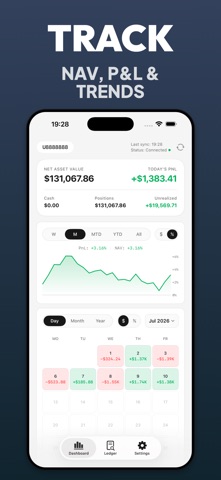
iLedger is an independent third-party app and is not affiliated with, authorized by, or endorsed by Interactive Brokers. Turn complex IBKR Flex reports into a clear, private investment ledger. Track portfolio performance, review trades and positions, and understand daily profit and loss without sending your financial data through a developer-operated server. KEY FEATURES • Portfolio dashboard View net asset value, realized and unrealized P&L, positions, cash, and performance trends in one place. • Trade history Search and filter completed trades by symbol, direction, account, and date. • Position tracking Review current positions, quantities, market values, cost basis, percentage of NAV, and unrealized P&L. • Performance analysis Explore daily performance, P&L calendars, and time-weighted or money-weighted returns. • Investment ledger Keep structured records imported from supported IBKR Flex reports and export available ledger data as an Excel workbook. • Local-first privacy Your data is processed on your device. iLedger does not operate a developer-owned server for collecting your portfolio data. • Private iCloud sync Optionally sync supported settings and investment records through the private iCloud container associated with your Apple Account. • Flexible display Choose number and date formats, account display preferences, return calculations, P&L color conventions, and light or dark appearance. HOW IT WORKS Create an Activity Flex Query in your Interactive Brokers account then enter its token and Query ID in iLedger. The app retrieves supported report data and turns it into dashboards searchable records and performance views.supported report data and turns it into dashboards, searchable records, and performance views. iLedger is an investment recordkeeping and analysis tool. It does not provide brokerage services, execute trades, offer investment advice, or guarantee the accuracy or availability of third-party report data.
Latest release
What’s New
• Fixed a blank screen that could occur on first launch. • Redesigned Positions with clearer holdings, contract details, and lot breakdowns. • Simplified daily P&L details and clarified Flex Query file exports.
Audience growth
Ratings growth
Baseline captured. Growth appears after the crawler observes a changed rating count.
Momentum comes from crawler snapshots for the tracked storefront. “Viral growth signal” means unusually fast recent rating gains; it is an indicator, not download data.
Price tracking
Price intelligence
First snapshot captured. The trend line starts after the next crawler price observation.
- First observed Aug 21, 2026 · 3:46 AM Free
Screenshots