About this app
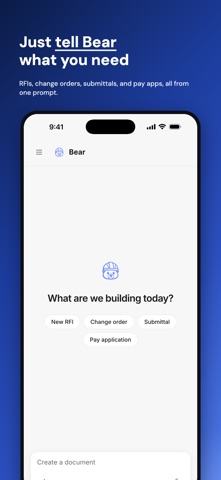
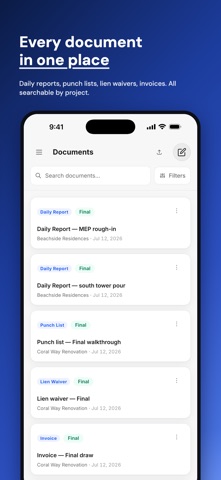
ConstructionBear turns a plain-English request into a finished construction document. Tell Bear what you need: an RFI, a change order, a daily field report, a submittal, a pay application. Bear asks for anything that is missing, fills in your company and project details, and produces a clean, professional PDF you can sign, mark up, and share in seconds. Bear remembers. Your projects, contacts, contract values, and company details are captured once and retrieved every time after that — say "another RFI for Brickell Tower" and Bear already knows the project, the architect, the numbering, and your letterhead. The more you use it, the less you have to type. Built for contractors, superintendents, and PMs who write paperwork from the truck, not the trailer. - 25+ construction document types, from RFIs to closeout checklists - Chat-first: describe the situation, Bear drafts the document of record - A memory layer for your business: projects, people, and terms auto-fill every future document - Sign, stamp, and mark up PDFs right on your phone - Share view or edit links with architects, owners, and subs - Projects, contacts, and a searchable document library - Voice input for hands-free drafting on the jobsite Subscriptions: Starter ($29.99/month, 25 documents), Business ($49.99/month, unlimited documents), and Organization ($199.99/month, 5 seats). Payment is charged to your Apple ID at confirmation of purchase. The subscription renews automatically unless cancelled at least 24 hours before the end of the current period. Manage or cancel anytime in your App Store account settings. Terms of Use: https://app.constructionbear.dev/terms Privacy Policy: https://app.constructionbear.dev/privacy
Latest release
What’s New
- A refreshed billing screen with your monthly usage at a glance - Company dashboard, now inside Organization settings with swipeable tabs for members, invites, and projects - Cleaner document viewing and simpler file names when sharing - Recents keeps every conversation at your fingertips - A launch screen that matches your theme - Performance and reliability improvements
Audience growth
Ratings growth
Baseline captured. Growth appears after the crawler observes a changed rating count.
Momentum comes from crawler snapshots for the tracked storefront. “Viral growth signal” means unusually fast recent rating gains; it is an indicator, not download data.
Price tracking
Price intelligence
First snapshot captured. The trend line starts after the next crawler price observation.
- First observed Aug 19, 2026 · 1:32 AM Free
Screenshots