About this app
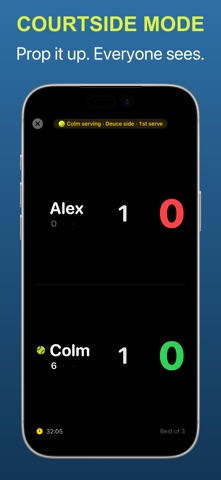
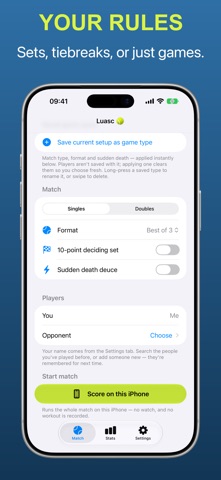
Nobody remembers the score at 4-5 in the third. Luasc does. One tap per point on your Apple Watch and it keeps games, sets, deuce, tiebreaks and change of ends straight, so you can keep your head in the match. Best with an Apple Watch. The whole session — warm-up included — is recorded as a real tennis workout, so heart rate, distance and active energy land in Health and Fitness alongside everything else you do. Scoring and logging the workout are one act: start the warm-up, play, and it's all there afterwards. The watch app runs on its own, so the phone can stay in the bag. Haptics confirm every tap, and a proper undo stack forgives the ones you didn't mean. No watch, or playing on an iPad? Score the whole match on the phone instead. Go point by point with ace, double fault and let, or — if you're honestly not walking back between points — tap once per game and leave it at the net post. Phone scoring doesn't record a workout; that part needs the watch. When the watch is keeping score, your iPhone mirrors it live. Either phone or iPad can go full-screen as a courtside scoreboard, built to sit at the net post, with tap-to-score when it's the device doing the scoring. Your iPhone will call the score out loud too, if you want it to — it's a toggle. The formats, done properly: - Singles and doubles, with correct serve rotation inside a doubles team - One set, best of three, or best of five - A ten-point match tiebreak for the deciding set, when your club plays the third as a breaker - A fixed number of games, played out in full: most games wins, level is a draw - TieBreak Tens - Advantage deuce, or sudden-death "short" deuce - Seven-point tiebreak at 6-6, with the serve rotation and change-of-ends prompts right Afterwards, on your iPhone: - Every match you've played, kept in full - Win-loss-draw records against each opponent and alongside each partner - A momentum chart for each match, built from every point of it - A player directory, so regulars are a tap, not a typing exercise. Starting on the watch is deliberately one tap with no name entry, so those matches begin under placeholders and you put names to them later - Optionally, where you played: a single location fix as the match starts, turned into a venue name. One fix, at the start — never continuous tracking — and it stays off until you switch it on No account. No sign-up, no password, nothing of yours on a server of ours — because there isn't one. Your history, players, presets and settings sync between your own devices through your private iCloud and stay there. No ads either. Luasc is Irish for "swing". It's pronounced LOO-sk. Terms of Service can be found here: https://www.apple.com/legal/internet-services/itunes/dev/stdeula/
Latest release
What’s New
Share the match, in the shape you're actually posting The card you send after a match now renders to two exact ratios — 4:5 for a feed, 9:16 for a story — instead of one odd size that got cropped on Instagram and letterboxed in Stories. And you pick which card, not just what shape. Five of them: the scoreboard on its own, a head-to-head scorecard, a sentence on how the match went, your own numbers, or the point-by-point momentum line. Luasc only offers the ones your match has the data for. Finish one that stayed level — a tiebreak, a decider, a one-point margin — and it will nudge you, once, to send it. Three corrections to the rules - A deciding set that reaches 6-6 now plays a ten-point tiebreak, the way all four Slams have since 2022, rather than a seven-point one. - On a no-ad deciding point, the receiver chooses which half to receive from. Luasc used to name the deuce court as though it knew. It no longer says. - The spoken score calls nought "love" and agrees the noun with the number: "one game to love", not "one games to zero". A tour that doesn't show you the door first The big button in onboarding now says Next and moves you forward; Skip is a quiet link in the corner. Three pages instead of four, opening with scoring on a watch or a phone rather than assuming a watch — and on iPad, which can't pair one, it never mentions a watch at all. Restore Purchases tells you what happened Restored, nothing to restore, or couldn't reach the App Store — instead of a spinner that came and went and left you to guess. Also fixed - Naming the players of a finished match could undo a name you'd just typed, if iCloud fetched an older copy in between. - Signing into a different iCloud account no longer copies the previous account's matches, players and places across to it. - The "New Match" watch complication opens match setup, so you can choose a preset, instead of dropping straight into warm-up. - The share nudge's button drew its icon invisibly and sat off centre. - Match history and the spoken score are both quicker, and naming a court can be cancelled instead of grinding on. The share card is free, every style of it. Scoring is too — every format, both devices, sync, workouts and per-match stats.
Audience growth
Ratings growth
Baseline captured. Growth appears after the crawler observes a changed rating count.
Momentum comes from crawler snapshots for the tracked storefront. “Viral growth signal” means unusually fast recent rating gains; it is an indicator, not download data.
Price tracking
Price intelligence
First snapshot captured. The trend line starts after the next crawler price observation.
- First observed Aug 23, 2026 · 6:55 AM Free
Screenshots