About this app
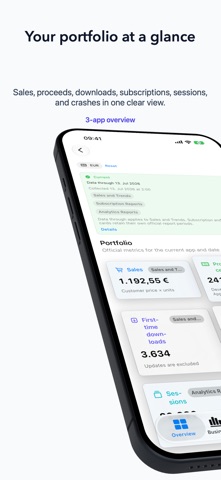
Official App Store Connect metrics across your entire portfolio—clearly aggregated on iPhone, iPad, and Mac. The macOS app makes your locally stored app trends available to compatible coding agents through its built-in MCP server. Trends Deck brings the portfolio-wide perspective of the former Apple Sales and Trends into a modern, local app. It downloads reports only from Apple's official App Store Connect API and report endpoints. Compare apps, follow Sales and Trends, subscriptions, acquisition, retention, finance, releases, reviews, performance and collection health without mixing incompatible report semantics. Highlights: • Native app for iPhone, iPad, and Mac • Built-in local MCP server for compatible coding agents on macOS • Portfolio overview with trends and deltas • App comparison and detail drill-down • Sales, developer proceeds, downloads and updates • Subscription status, duration, products and events • Official Analytics acquisition, sessions, crashes and retention • Finance reports kept separate by fiscal period and currency • Offline access to normalized cached reports • Data Health view for generated, pending, unavailable and blocked reports • Built-in demo portfolio with three fictional apps To use MCP on Mac, open More > MCP Server, enable the local server, and add the endpoint shown in the app to a compatible coding agent. You can then ask the agent to compare apps, explain changes in proceeds or downloads, inspect subscriptions and acquisition, or summarize releases, reviews, and diagnostics. The server is read-only, available only on your device at 127.0.0.1, never changes App Store Connect data, and never exposes credentials or private keys. Your App Store Connect credentials are stored in the system Keychain. Report processing and caching happen locally on your device. Unavailable official values are shown as data gaps rather than estimated. Portfolios with more than €500 in official developer proceeds across the last 30 complete Sales and Trends days require the annual Pro subscription. The subscription renews automatically unless cancelled at least 24 hours before the current period ends. Terms of Use: https://www.apple.com/legal/internet-services/itunes/dev/stdeula/ Privacy Policy: https://bernhardhering.de/privacy
Latest release
What’s New
The selected Sales metric is now remembered on iPhone, iPad, and Mac and restored the next time the app launches.
Audience growth
Ratings growth
Baseline captured. Growth appears after the crawler observes a changed rating count.
Momentum comes from crawler snapshots for the tracked storefront. “Viral growth signal” means unusually fast recent rating gains; it is an indicator, not download data.
Price tracking
Price intelligence
First snapshot captured. The trend line starts after the next crawler price observation.
- First observed Aug 27, 2026 · 12:48 AM Free
Screenshots