About this app
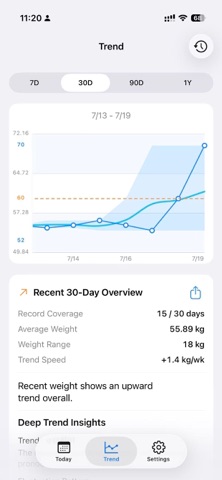
WeightTrace is a local-first weight log and trend analysis app. No account is required, so you can start logging right away. Your weight data stays on your current device by default. Log with ease • Record in kg or lb • Save multiple original entries on the same day • Review, edit, or delete history from the calendar • Choose a daily representative record so trends reflect your real routine Understand your changes • Explore 7-day and 30-day trends; Pro unlocks 90-day and 1-year views • Compare your actual weight line with a smoothed trend, fluctuation range, and average • Review total change, trend direction, recording coverage, and period comparisons • Tap or press a data point to see its date, weight, and difference from your goal Manage your goals • Choose weight loss, weight gain, or maintenance mode • Set a target weight, starting weight, target date, and maintenance range • Follow goal progress from Today, Trends, and widgets • Keep goal history and completion status Work with your devices • Optionally connect Apple Health to read or write weight records • Create private, on-device reminders for regular weigh-ins • Check recent status at a glance with Home Screen widgets • Hide precise weight values from widgets when you want more privacy Privacy first WeightTrace requires no account. Weight records stay on your device by default, and you can export or delete your data whenever you choose. Apple Health access is entirely optional; local tracking remains available if you decline permission. Some long-term trends, advanced analysis, average-line display, chart personalization, and widget modes require WeightTrace Pro. Core weight logging, complete history, Apple Health connection, reminders, and data controls remain available for free. Trends and insights in WeightTrace are for personal tracking only and are not medical advice, diagnosis, or treatment. Terms of Use (EULA): https://www.apple.com/legal/internet-services/itunes/dev/stdeula/ Privacy Policy: https://sites.google.com/view/weight-trace-privacy
Latest release
What’s New
Optimize functionality and enhance user experience
Audience growth
Ratings growth
Baseline captured. Growth appears after the crawler observes a changed rating count.
Momentum comes from crawler snapshots for the tracked storefront. “Viral growth signal” means unusually fast recent rating gains; it is an indicator, not download data.
Price tracking
Price intelligence
First snapshot captured. The trend line starts after the next crawler price observation.
- First observed Aug 19, 2026 · 3:17 PM Free
Screenshots