About this app
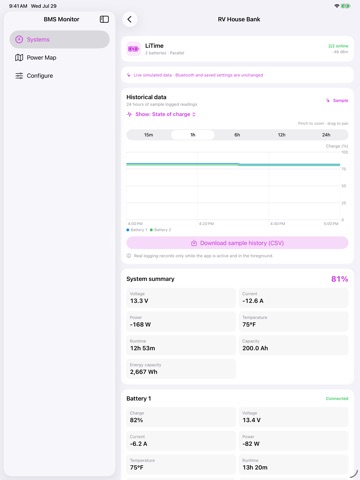
Monitor compatible Bluetooth batteries and power systems from one clear dashboard. SUPPORTED BATTERIES AND BMS TYPES Standard support: • LiTime batteries with built-in Bluetooth • Daly BMS units and batteries documented for the SMART BMS app • Supported EcoFlow power stations using local Bluetooth Experimental battery and BMS integrations: • Redodo and Power Queen smart batteries • JBD / Jiabaida / Xiaoxiang-compatible batteries, including Overkill Solar-compatible systems • Renogy batteries with built-in Bluetooth; Standard and Pro protocols are detected automatically • JK / Jikong BMS hardware/software generation 6 or newer • CHINS, Lithtech, Volthium, and other identified E&J-protocol batteries • SOK and other explicitly identified ABC BMS batteries • WattCycle and TDT batteries using the supported HS02/TDT Bluetooth profile • HumsiENK, ECO-WORTHY, and DC HOUSE compatible batteries • EG4 LL / Sungold compatible batteries • Pylontech RT-series batteries • ANT smart BMS units Experimental power-system integrations: • Anker SOLIX, BLUETTI, Renogy BT-1/BT-2, and Zendure SolarFlow • Lithionics, Pro BMS, Vatrer, RoyPow, and Seplos Experimental compatibility and telemetry completeness can vary by model, internal BMS supplier, and firmware. Confirm the battery brand, exact model, or internal BMS family before connecting. WHAT YOU CAN MONITOR See live state of charge, voltage, current, power, temperature, remaining capacity, battery health, cycle count, signal strength, cell voltages, and channel-level power flow where supported. FEATURES • Discover nearby supported systems and verify live telemetry before saving • Monitor multiple battery and power systems from a single dashboard • View aggregate metrics and detailed device readings • Map paired and nearby systems with optional Power Map • Review locally recorded history while the app is active • Organize series and parallel battery configurations • Keep configuration synchronized across your devices with private iCloud storage • Explore the interface in Demo Mode without pairing hardware • Use read-only monitoring that does not expose controls for changing device settings HARDWARE Compatible Bluetooth-enabled hardware is required for live monitoring. Available readings vary by manufacturer, model, and firmware. Most devices allow only one monitoring app to connect at a time. PRIVACY No BMS Monitoring Suite account is required. The app includes no advertising, analytics, or tracking. Telemetry and optional Power Map location data are processed locally. Optional configuration synchronization uses your private iCloud account. EcoFlow monitoring requires an EcoFlow account identifier, obtained by signing in or entering the numeric User ID, so the app can establish the local Bluetooth session.
Latest release
What’s New
- Bug fixes - Experimental support for Victron
Audience growth
Ratings growth
Baseline captured. Growth appears after the crawler observes a changed rating count.
Momentum comes from crawler snapshots for the tracked storefront. “Viral growth signal” means unusually fast recent rating gains; it is an indicator, not download data.
Price tracking
Price intelligence
First snapshot captured. The trend line starts after the next crawler price observation.
- First observed Aug 19, 2026 · 3:17 PM Free
Screenshots