About this app
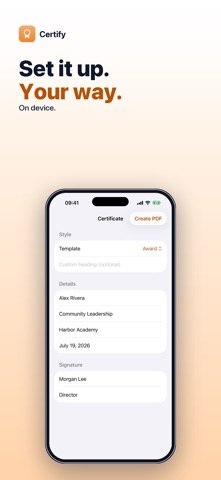
Need a certificate for a student, an employee, a team or a class in the next five minutes? Certify turns a few details into a classic, print-ready certificate PDF — no design app or template hunting. Choose a template, enter the recipient, the award or course, and who signs it, then create the PDF. Print it, share it or save it to Files. • FOUR TEMPLATES — Award (Certificate of Achievement), Diploma, Completion (Certificate of Completion) and Participation (Certificate of Participation), each with matching wording such as “has successfully completed”. • YOUR OWN HEADING — keep the standard title or type your own, like “Employee of the Month” or “Star Reader”. • THE DETAILS THAT MATTER — recipient name, award or course title, an optional organization name and a date written any way you like. • SIGNATURE LINE — the signer's name and title under a signature line (or “Authorized signature” if you leave the title blank), next to the date. • CLASSIC LOOK — landscape US Letter with a double border, corner ornaments, warm gold accents and a seal emblem, ready for card stock or plain paper. • PRINT, SHARE OR SAVE — one tap to print, share or save the PDF to Files. Good to know: Certify makes one certificate at a time in a single classic design — there are no custom colors, fonts, logos or photos, and no bulk import of a list of names. Sign it by hand after printing. Everything is created on your iPhone — nothing is uploaded and no account is needed. Try it free — 3 certificate exports. A one-time $4.99 purchase unlocks unlimited certificates. No subscription, no ads. Questions: overlapmarr@gmail.com
Latest release
What’s New
Localized App Store screenshots for every language.
Audience growth
Ratings growth
Baseline captured. Growth appears after the crawler observes a changed rating count.
Momentum comes from crawler snapshots for the tracked storefront. “Viral growth signal” means unusually fast recent rating gains; it is an indicator, not download data.
Price tracking
Price intelligence
- First observed Aug 11, 2026 · 8:38 AM Free
Screenshots