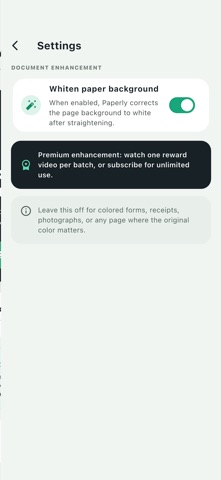
About this app
Paperly Docu Scan is a powerful on-device batch document scanner for iOS. Capture multiple pages in a single session, position the four corners precisely, and Paperly automatically rectifies each page using perspective correction. Key features include: • Batch scanning — capture multiple pages without leaving the camera • 4-corner adjustment — drag corners for pixel-perfect edge detection • Perspective correction — automatic homography straightens tilted shots • Background whitening — built-in enhancement to normalize paper to clean white • Multi-page PDF export — combine all pages into one ordered PDF • Share anywhere — send your PDF via email, messaging, or cloud storage • 100% on-device — all image processing happens locally, nothing leaves your phone • Gallery import — add existing photos from your camera roll All features are free. Subscribe to Paperly Pro for an ad-free experience. Privacy Policy: https://apps.cloudspirit.co.uk/docuscan/privacy.html Terms of Use: https://apps.cloudspirit.co.uk/docuscan/terms.html
Audience growth
Ratings growth
Baseline captured. Growth appears after the crawler observes a changed rating count.
Momentum comes from crawler snapshots for the tracked storefront. “Viral growth signal” means unusually fast recent rating gains; it is an indicator, not download data.
Price tracking
Price intelligence
First snapshot captured. The trend line starts after the next crawler price observation.
- First observed Aug 16, 2026 · 12:53 AM Free
Screenshots