About this app
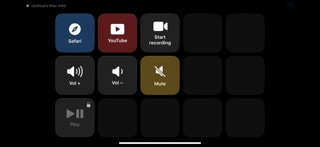
Your iPhone or iPad becomes a wireless stream deck for your Mac: a full-screen grid of big, glowing buttons that switch OBS scenes, launch apps, fire keyboard shortcuts, run Apple Shortcuts, and more. Tap the phone — the Mac does it instantly, over your own Wi-Fi. PAY ONCE, OWN IT No subscription. No account. No cloud. Try it free with six buttons, and unlock everything with a single one-time purchase. BUILT FOR STREAMING • Native OBS Studio integration (OBS 28 or later) — no plugins to install • Switch scenes from your real scene list, start/stop streaming and recording, mute your mic • Live state on every button: the record button glows while you're recording, your current scene stays highlighted, your mic button shows its true mute state • Runs entirely on your local network — taps land in milliseconds CONTROL YOUR WHOLE MAC • Send any keyboard shortcut to any app • Launch apps, open files and websites • Run any Apple Shortcut — if Shortcuts can do it, your deck can too • System controls: volume, mute, play/pause, next/previous track • Multi-actions: chain steps with delays into one button • Shell scripts for power users FEELS LIKE HARDWARE • Pure black, edge-to-edge button grid with crisp haptics on every press • Pages you swipe between, folders that open sub-decks • Custom icons, colors, and labels for every button • Profiles that switch automatically when you change apps on the Mac • The screen stays awake while you're connected PRIVATE BY DESIGN • Pair once with a 6-digit code shown on your Mac — like pairing AirPods • Every connection is end-to-end encrypted, and nothing ever leaves your network • No account, no analytics, no data collection. Ever. GETTING STARTED On your Mac, download the free companion app, Virtual Stream Deck Hub, from our website. Open this app on your iPhone or iPad — your Mac appears automatically. Type the 6-digit code. That's it: you're paired for good. Design your layouts in the Mac editor — drag in actions, pick icons and colors — and watch every change appear on your device instantly. REQUIRES • iOS/iPadOS 18 or later • A Mac running macOS 15 (Sequoia) or later with the free Virtual Stream Deck Hub app • Both devices on the same network • OBS features require OBS Studio 28+ with its WebSocket server enabled
Latest release
What’s New
bug fixes
Audience growth
Ratings growth
Baseline captured. Growth appears after the crawler observes a changed rating count.
Momentum comes from crawler snapshots for the tracked storefront. “Viral growth signal” means unusually fast recent rating gains; it is an indicator, not download data.
Price tracking
Price intelligence
First snapshot captured. The trend line starts after the next crawler price observation.
- First observed Sep 4, 2026 · 4:46 AM Free
Screenshots