About this app
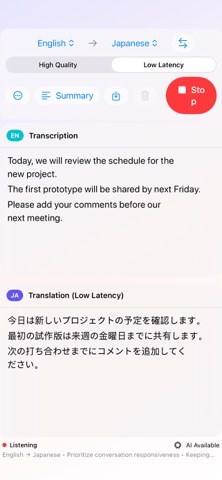
wayaknow turns spoken words into live text, translates each completed sentence into a language you choose, and organizes the conversation into a clear summary. Supported languages Japanese, English, Korean, Simplified Chinese, Traditional Chinese, Spanish, French, German, Brazilian Portuguese, and Italian. Choose the spoken and target languages independently, even while listening. Features • Live transcription and sentence-by-sentence translation • On-device automatic detection between the selected transcription and translation languages by utterance (Full Access) • Low Latency for keeping pace or High Quality for more natural wording • Five summary formats: Standard, Meeting Notes, Lecture Notes, Research Presentation, and Guidance & Procedures • Save transcripts, translations, and summaries as text • An always-on-top mini view on Mac • Authorized Mac System Audio input with Full Access • View the latest iPhone transcript or translation on Apple Watch Speech recognition, translation, and summaries use Apple-provided on-device frameworks and models. In Full Access automatic mode, a bundled whisper.cpp model identifies only the language of each utterance, then Apple SpeechTranscriber produces the transcript. Whisper transcription is used only as a fallback when Apple recognition is unavailable. Audio, transcripts, translations, and summaries are not sent to developer-operated servers. Apple models may need preparation on first use; once ready on a supported device, available core features can work without an internet connection. High Quality translation and summaries require an Apple Intelligence–compatible device and ready models. In the free version, translation, summaries, and saving pause for one minute after every five minutes of microphone use. The one-time wayaknow Full Access purchase removes the wait and unlocks automatic language detection by utterance and Mac System Audio. It is not a subscription. Always verify important content against the original audio. Before processing third-party audio, confirm the required rights, permission, participant consent, service terms, copyright, privacy, and applicable law.
Latest release
What’s New
• A new Save button on the summary screen lets you save the generated summary by itself as a text file.
Audience growth
Ratings growth
Baseline captured. Growth appears after the crawler observes a changed rating count.
Momentum comes from crawler snapshots for the tracked storefront. “Viral growth signal” means unusually fast recent rating gains; it is an indicator, not download data.
Price tracking
Price intelligence
First snapshot captured. The trend line starts after the next crawler price observation.
- First observed Sep 4, 2026 · 7:53 AM Free
Screenshots