About this app
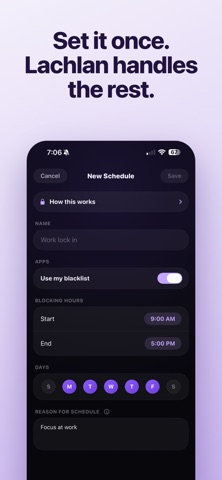
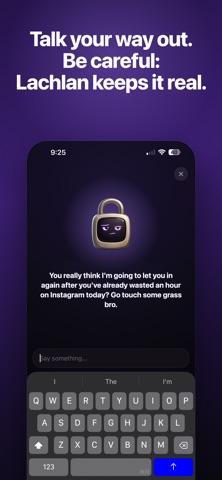
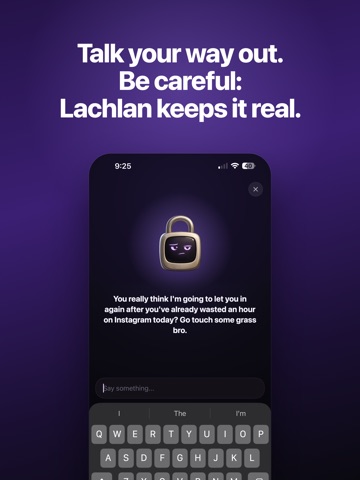
Every app blocker is one tap from off. This one asks why. Lachlan is a small, deeply opinionated padlock who blocks your most distracting apps on a schedule you set, and then makes you explain yourself before he lets you back in. WHY THIS WORKS WHEN NOTHING ELSE HAS Most blockers are a wall you learn to climb in about three seconds. Lachlan is a conversation you have to have with a character who remembers what you said you wanted, and wants to know why you're doing this instead. The friction isn't the lock. It's the awkwardness. HOW IT WORKS 1. Pick your problem apps. Social media, games, news, whatever's eating your afternoons. 2. Set a schedule. Work hours, evenings, the whole day if you're feeling brave. 3. Try to open a blocked app and you'll hit the shield instead. 4. Open Lachlan and make your case. Depending on how good your reason is, he'll grant you 5, 15, or 30 minutes. 5. He keeps score. The fourth unlock of the day does not go like the first. Need to lock down right now? Stat a hard lock for an instant lockdown. Emergencies only, and he means it. HE ACTUALLY REMEMBERS YOU When you set up, Lachlan asks why you're cutting back and what you'd do with the time you got back. Then he brings it up. "You said you wanted to finish the record" lands very differently at 11pm than a generic productivity notification. He knows your name, your reasons, and exactly how many times you've caved today. Most blockers are stateless. Lachlan is not, and that's the whole difference. WHAT LACHLAN IS NOT He's not a vault, and we're not going to pretend he is. If you're determined, you can switch all of this off in Settings in about a minute, Apple guarantees you that, on every app in this category, whatever their marketing says. What Lachlan does is make sure you never do it by accident. Caving becomes a decision instead of a reflex. That turns out to be most of the battle. ALSO INCLUDED - A home screen widget showing Lachlan's current mood, which is rarely good - Custom block screens - Works offline, on a plane, in a tunnel, anywhere DEVICE REQUIREMENTS — PLEASE READ FIRST Lachlan's AI runs on Apple Intelligence, which requires iPhone 15 Pro, iPhone 15 Pro Max, or iPhone 16 or later, running iOS 26. On earlier iPhones, Lachlan can't talk — and since talking to Lachlan is the entire app, please check your device before subscribing. Subscription is required for access to the above features. https://www.apple.com/legal/internet-services/itunes/dev/stdeula/
Latest release
What’s New
- Doom scrolling notification to call you out when you're on your phone for a while - Lachlan now greets you on the home screen depending on the date, time, and his mood - Improved conversation memory for a more authentic experience - Bug fixes
Audience growth
Ratings growth
Baseline captured. Growth appears after the crawler observes a changed rating count.
Momentum comes from crawler snapshots for the tracked storefront. “Viral growth signal” means unusually fast recent rating gains; it is an indicator, not download data.
Price tracking
Price intelligence
First snapshot captured. The trend line starts after the next crawler price observation.
- First observed Sep 8, 2026 · 1:07 AM Free
Screenshots