About this app
Namaaz Tracker helps you stay consistent with your daily prayers. Log each namaaz, watch your streak grow, and keep every prayer on time — with accurate prayer times, a Qibla compass, and the Hijri calendar built right in. DAILY PRAYER TRACKING • Mark all five daily prayers — Fajr, Zohar, Asr, Magrib and Isha • Record how each was prayed: in Masjid, in Markaz/Imamat, on time, qaza, or missed • A simple daily checklist that takes seconds to update • Combine Zuhr–Asr and Maghrib–Isha if that's how you pray • Fill in many days at once with bulk update QURAN TRACKER • One tap to mark that you've read Quran today • A separate Quran streak, tracked alongside your prayer streak • A daily reminder at a time you choose STREAKS & STATISTICS • Build and maintain your prayer streak • Monthly and yearly stats show exactly where you stand • Spot missed prayers at a glance and make them up PRAYER TIMES & QIBLA • Prayer times on the Fatimid reckoning, matching the community timetable • Set your location by city, or follow your device • Live countdown to the next prayer • Built-in Qibla compass points you to the Kaaba from anywhere HIJRI CALENDAR • Choose the Hijri calendar you follow, and fine-tune it to your local sighting • Full monthly calendar view of your prayer history TASBEEH COUNTER • Digital tasbeeh for your daily zikr • Count carries over and syncs with your home screen HOME-SCREEN & LOCK-SCREEN WIDGETS • Ten widgets: today's checklist, Quran, next prayer, streak, Qibla, Hijri date, prayer times, weekly view, tasbeeh, and a full Today view • Mark a prayer or your Quran read straight from the widget — no need to open the app • Next-prayer countdown on your Lock Screen • Tap a widget to jump straight to the app REMINDERS • Gentle notifications so a prayer never slips by FIVE LANGUAGES • English, Hindi, Gujarati, Urdu and Arabic Namaaz Tracker keeps your worship organised, private, and always within reach. Free, and your data is yours — you can delete your account from inside the app at any time.
Latest release
What’s New
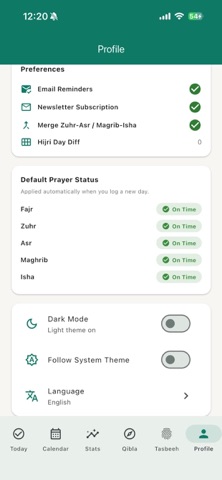
Your preferences are now a tap away. On the Profile screen, the Preferences and Default Prayer Status cards open straight into Edit profile, so changing a setting no longer means hunting for the way in. New: a default for the daily Quran tick. If you read every day, switch it on and each new day starts already marked as read. It's off unless you turn it on, so your streak only ever counts days you actually read.
Audience growth
Ratings growth
Baseline captured. Growth appears after the crawler observes a changed rating count.
Momentum comes from crawler snapshots for the tracked storefront. “Viral growth signal” means unusually fast recent rating gains; it is an indicator, not download data.
Price tracking
Price intelligence
First snapshot captured. The trend line starts after the next crawler price observation.
- First observed Aug 20, 2026 · 12:21 AM Free
Screenshots