About this app
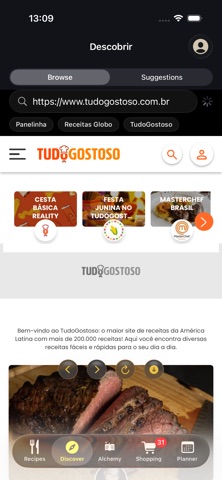
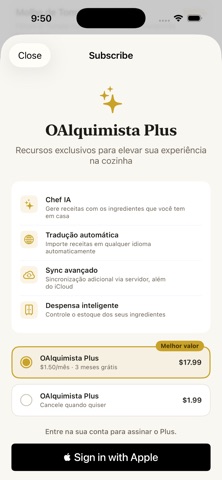
OAlquimista is your personal recipe book — elegant, smart, and always with you. Save your favorite recipes with photos, custom categories, and tags. Import from any cooking website with a single tap. Plan your week's meals and generate shopping lists automatically. No ads, ever. RECIPE COLLECTION • Grid or list — pick your view style • Custom categories and collections with colors and icons • Filter by tags, ingredients, and favorites • High-resolution photos for every recipe • Automatic import from hundreds of cooking websites COOK MODE • Full-screen, step-by-step instructions • Built-in timers for every step • Screen stays on while you cook • Real-time serving adjustments • Visual highlights for each step's ingredients MEAL PLANNER • Organize breakfast, lunch, and dinner • Clear, intuitive weekly view • Generate the week's shopping list with one tap • Export to your iPhone Calendar SHOPPING LIST • Add ingredients straight from a recipe • Items grouped by recipe or added manually • Check items off as you shop • Clear purchased items with one tap SMART IMPORT • Paste a link from any recipe website • Import from books and magazines via camera • PDF and free-text support • Works with hundreds of popular cooking sites iCLOUD SYNC • Recipes synced across all your devices • Works on iPhone, iPad, and Mac • Your data stays safe in your own private iCloud — free, always OALQUIMISTA PLUS (optional) • Alchemy: generate new recipes from ingredients you already have at home • Automatic translation of recipes imported from foreign-language sites • Additional server-side sync, alongside iCloud • Smart pantry and advanced features OALQUIMISTA RECIPES • Curated official recipes, always clearly disclosed with a transparency badge OAlquimista was built for people who love cooking and want their recipes organized beautifully and practically. The essentials are, and always will be, free. No ads.
Latest release
What’s New
1.1.0 is here! What's new: • Alchemist's Journey — 10 levels, 4 progress trails, and 40+ achievements (themed, individual, and secret) to track your growth in the kitchen. • Photo Alchemy — snap a photo of your fridge or pantry and let AI recognize the ingredients to generate recipes. • EPUB import — pull recipes straight from ebooks, with the same multi-recipe-per-file support already available for PDF. • Automatic translation — recipes imported in another language are now detected automatically and offer one-tap translation, including in batch when the file has multiple recipes. • Smart substitutions — ingredient swap suggestions (now with a choice between multiple options, including vegan ones) and serving-size scaling with cook-time estimates. • Quick time filter — find recipes under 15, 30, or 60 minutes right on the home screen. • A more complete Alchemy — pick servings and a max time for generated recipes, and reuse your last purchase's ingredients with one tap. • Shopping list grouped by market section (produce, dairy, butcher...) and a planner showing the full week with per-meal slots. Fixes: the shopping list now has a button to clear the whole cart; the keyboard now dismisses automatically when generating recipes in Alchemy; plus additional stability improvements.
Audience growth
Ratings growth
Baseline captured. Growth appears after the crawler observes a changed rating count.
Momentum comes from crawler snapshots for the tracked storefront. “Viral growth signal” means unusually fast recent rating gains; it is an indicator, not download data.
Price tracking
Price intelligence
First snapshot captured. The trend line starts after the next crawler price observation.
- First observed Aug 20, 2026 · 9:24 PM Free
Screenshots