About this app
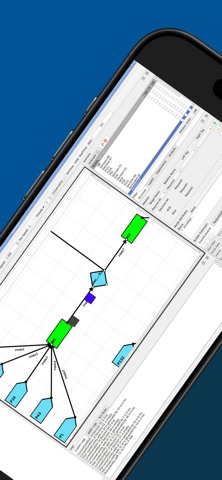
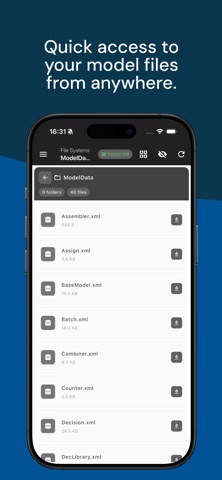
SimNexus is an industrial simulation platform that enables you to model production, logistics, assembly, and service systems, run discrete-event simulations, and compare alternative operating scenarios. Designed for industrial engineers, operations research professionals, production and logistics teams, students, researchers, and decision-makers, SimNexus helps you examine system behavior before making changes to real operations. Identify bottlenecks, evaluate capacity and resource utilization, and support process improvement decisions with measurable simulation results. MODEL PROCESSES AND TEST SCENARIOS Model the movement of materials, work orders, customers, patients, vehicles, and other entities through a system. Define processing times, queues, resources, shifts, routes, work schedules, and decision rules. Compare alternative capacities, layouts, schedules, routing policies, and operating strategies in a controlled simulation environment. SIMNEXUS COMPONENTS SimNexus provides flexible and modular components for representing complex processes in detail: • Generators, entities, and attributes • Processes, combiners, and separators • Resources, queues, and work schedules • Transport systems such as AGVs, AMRs, forklifts, vehicles, and conveyors • Decision nodes, product routes, and operation sequences • Real-time analytics, charts, counters, and dashboards Monitor queue lengths, resource utilization, bottlenecks, and key performance indicators while a simulation is running. APPLICATION AREAS • Manufacturing and production systems: Analyze material flows, machine layouts, production capacity, line balancing, and work-in-process inventory. • Assembly line simulation: Model cycle times, buffer capacities, workstation workloads, and manual or automated assembly operations. • Job shop and flow shop production: Evaluate order scheduling, machine loading, product routing, waiting times, and bottlenecks. • Push and pull systems: Compare forecast-driven, order-driven, and Kanban-based production strategies according to inventory, lead time, and system response. • Lean manufacturing and JIT: Examine waste caused by excess inventory, unnecessary transportation, and waiting; analyze takt time, Kanban levels, and cellular manufacturing structures. • Logistics and warehouse management: Simulate picking and storage systems, shipment processes, fleet size, and AGV or AMR traffic. • Supply chains and distribution networks: Model supplier, factory, distribution center, and retail networks; analyze demand variation, supply risks, and logistics scenarios. • Service systems: Study queues, waiting times, staffing, and service performance in hospitals, banks, call centers, and public facilities. • Airports and transportation systems: Model passenger, baggage, cargo, and vehicle flows to evaluate congestion and capacity requirements. • Defense, energy, and mining operations: Test mission, maintenance, logistics support, resource allocation, facility flow, failure, and downtime scenarios without operational risk. ANALYZE SYSTEM PERFORMANCE Evaluate throughput, cycle and waiting times, WIP levels, resource utilization, queue behavior, capacity constraints, and bottlenecks. Compare how alternative scenarios affect system performance and support process improvement, capacity planning, and operational decisions. CLOUD AND DESKTOP Manage the complete simulation and analysis workflow from the cloud. Access projects, run models, manage scenarios, and review results across supported cloud and desktop environments. Some features require an internet connection and a user account. Certain cloud operations may require credits, an active balance, or a subscription. Feature availability may vary by platform and selected plan.
Audience growth
Ratings growth
Baseline captured. Growth appears after the crawler observes a changed rating count.
Momentum comes from crawler snapshots for the tracked storefront. “Viral growth signal” means unusually fast recent rating gains; it is an indicator, not download data.
Price tracking
Price intelligence
First snapshot captured. The trend line starts after the next crawler price observation.
- First observed Sep 24, 2026 · 7:55 PM Free
Screenshots