About this app
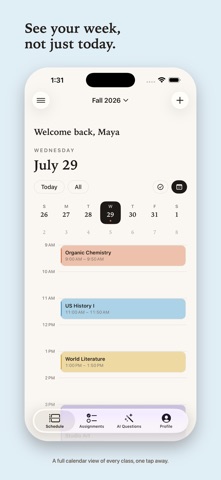
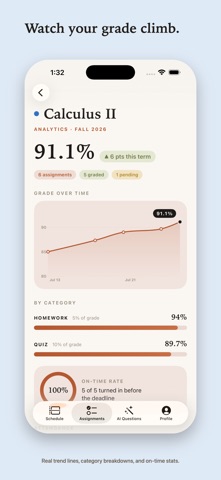
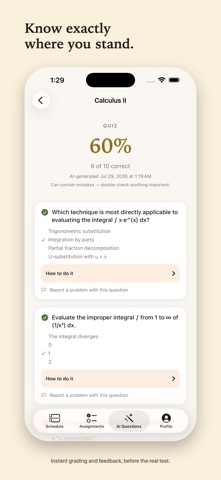
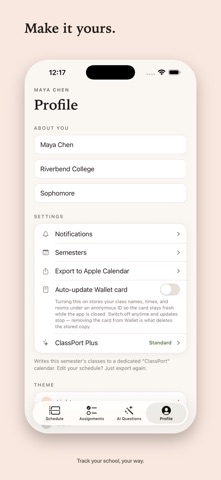
Your classes, assignments, and grades. One calm place. ClassPort always knows where you're supposed to be. Open it and today is right there: every class, its building, floor, and room, all at a glance. TODAY AT A GLANCE • See your day as a simple timeline, or switch to the calendar to see your whole week • Classes that overlap sit side by side, so nothing gets hidden ASSIGNMENTS THAT ADD UP • Track what's due and how much it's worth • Enter your grades as they come in, and ClassPort keeps a running grade for every class automatically • No spreadsheet, no math ATTENDANCE, ONE TAP • Mark yourself present, absent, or note that class didn't meet, all with a single tap • Watch your attendance rate for each class build over the semester SEE YOUR SEMESTER • Grade trends, category breakdowns, on-time rates, and attendance, all in one place • A clear, honest picture of exactly how your semester is going REMINDERS THAT RESPECT YOU • A heads-up before big assignments are due • A nudge the morning of class • A gentle catch-up if something slips through the cracks • No spam, just the right reminder at the right time WALLET, WIDGETS & MORE • Add a ClassPort card to Apple Wallet and your next class is always one swipe away, even when the app is closed if you turn on auto-updates • Add widgets to your Home Screen or Lock Screen for your next class and what's due • Export your whole schedule to Apple Calendar in one tap AI QUESTIONS • Turn your own notes, slides, or a photo of your textbook into a real practice quiz in seconds • Multiple choice and short answer, with a full explanation for every question • Free to try, and unlocked further with ClassPort Plus PRIVATE BY DESIGN • No account. No ads. No tracking. Your planner data stays on your phone • Only two features ever leave your device: Wallet auto-updates and AI Questions • Both are optional and off until you turn them on • Full details are in the Privacy Policy Terms of Use: https://sayedu.github.io/ClassPort-website/terms.html
Latest release
What’s New
New: get a reminder right before your next class starts, with the room and building. Reminders are simpler now, just one clear setting for how far ahead to notify you. Fixed: setting up your class schedule now walks you through creating your semester properly. Fixed: tapping your semester now lets you edit it. Fixed: grade weights can no longer accidentally add up to more than 100%. Small visual fixes on smaller iPhones.
Audience growth
Ratings growth
Baseline captured. Growth appears after the crawler observes a changed rating count.
Momentum comes from crawler snapshots for the tracked storefront. “Viral growth signal” means unusually fast recent rating gains; it is an indicator, not download data.
Price tracking
Price intelligence
First snapshot captured. The trend line starts after the next crawler price observation.
- First observed Sep 1, 2026 · 1:32 PM Free
Screenshots