About this app
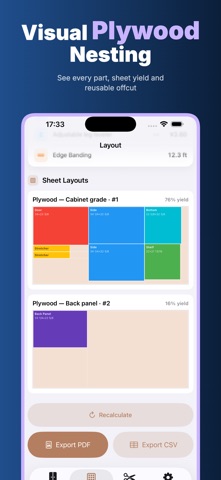
Plan the cabinet before the first sheet reaches the saw. Casework turns dimensions and construction choices into a parts list, sheet layout, purchasing summary and cutting guide for cabinetmakers, woodworkers, small shops, contractors and serious DIY builders. PRIVATE BY DESIGN • Offline — design projects, calculate parts, review layouts and create exports without an internet connection • No Login — no account, email address, password or team workspace is required • Privacy First — client details, job notes and cabinet measurements remain under your control • On Device — projects, cabinet calculations, nesting and document creation run on your iPhone • No Cloud Upload — Casework does not automatically upload projects, measurements, client data or exported files Projects are saved in local app storage. PDF and CSV files are created locally and leave the app only when you choose a destination in the iOS share sheet. BUILD A BOX OR A CABINET RUN Start with a single drawer box or a cabinet run. Add base, wall and tall cabinets; set quantity and finished outside width, height and depth. Work in millimeters or fractional inches. Set carcass and back thickness, choose an inset, full-overlay or captured-groove back, and select butt, dado or rabbet joinery. Add doors, drawers and adjustable shelves. Casework derives the required panels from those choices. GET A CONSISTENT CUT LIST The generated list merges identical parts and shows quantity, length, width, thickness, grain direction and edge-banding needs. Change a dimension and recalculate to rebuild the result from the project instead of maintaining a separate spreadsheet. LAY OUT PARTS ON SHEET STOCK Casework groups parts by thickness and packs them onto matching sheets with a fast guillotine-style process. Set saw kerf, trim margin and grain lock. Grain-sensitive parts keep their direction while eligible parts may rotate. Review color-coded layouts, full sheets needed, material use and reusable offcuts. Warnings flag invalid dimensions, oversize panels and unplaced parts. USE YOUR OWN MATERIALS AND PRICES Edit materials such as plywood, MDF or melamine with sheet size, thickness, price and grain direction. Casework matches the nearest available thickness and totals whole-sheet material cost in the device or selected currency. PREPARE HARDWARE AND EDGE BANDING Get estimated quantities and cost for hinges, drawer slides, shelf pins, handles and leg levelers. Edit item names and prices, and review modeled edge-banding length. FOLLOW THE CUTTING ORDER The Cut tab turns each sheet into an ordered checklist with direction, reference-edge offset, released part and size. Mark steps complete at the saw and reset when needed. KEEP JOBS ORGANIZED Create, switch, duplicate and delete local projects. Keep client, site and notes per job, and shop contact details for the PDF letterhead. Choose 1/16 or 1/32 inch, or 1, 0.5 or 0.1 millimeter display precision. EXPORT SHOP-READY OUTPUT Create a US Letter PDF with shop letterhead, project and client details, sheet and cost summaries, cut list, hardware list, nesting diagrams and review notes. Export the cut list as CSV for a spreadsheet. Print, save to Files or share using the destination you select in iOS. Casework is a planning aid, not a replacement for professional judgment or machine-specific optimization. Confirm measurements, stock, joinery allowances, grain, edge treatment, hardware, saw setup, kerf, safety procedures and the generated plan before purchasing or cutting. Adjust results for your methods. Some advanced planning and export capabilities require Casework Pro. Before using them, the app clearly presents monthly and yearly options, including a 7-day free trial, so you can choose what fits your workflow. Privacy Policy https://woodcuttool.com/legal/Casework/privacy/ Terms of Use https://www.apple.com/legal/internet-services/itunes/dev/stdeula/
Latest release
What’s New
This update focuses on bug fixes and performance improvements, making project editing, calculations, sheet nesting, and exports smoother and more reliable.
Audience growth
Ratings growth
Momentum comes from crawler snapshots for the tracked storefront. “Viral growth signal” means unusually fast recent rating gains; it is an indicator, not download data.
Price tracking
Price intelligence
- First observed Aug 11, 2026 · 8:03 AM Free
Screenshots