About this app
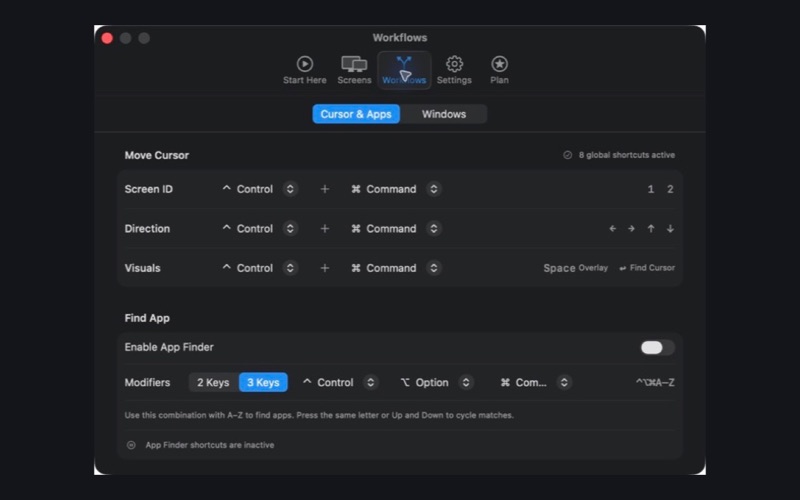
CursorHop is a lightweight menu bar utility for Mac users with multiple displays. Stop dragging your mouse across large monitors. CursorHop dynamically lists connected displays so you can jump to any managed screen, move left, right, up, or down by physical layout, or reveal screen numbers with global keyboard shortcuts. Features: • Jump to currently connected Screen 1-N with global shortcuts (Free up to 2 managed displays, Pro up to 8) • Move the cursor left, right, up, or down by display layout • Show screen numbers on every connected display • Find the current cursor with a lightweight pulse • Find and activate running apps by initial, including pinyin initials for Chinese app names • Cycle through apps that share the same initial • Set CursorHop to launch at login • Use the built-in guide to configure native macOS App Shortcuts for window movement CursorHop works without Accessibility permission in the Mac App Store build. Window movement is performed only by user-configured macOS App Shortcuts. CursorHop Free remains available without a time limit. CursorHop Pro includes a one-month free trial and raises the managed display limit from 2 to 8. Terms of Use (EULA): https://www.apple.com/legal/internet-services/itunes/dev/stdeula/ Privacy Policy: https://download.cursorhop.ngsense.com/privacy.html
Latest release
What’s New
App Finder can now restore minimized apps, stay visible above Settings, and cycle matching apps more reliably. This update also improves Chinese pinyin-initial matching, multi-display overlays, cursor-finding feedback, shortcut settings, localization, Launch at Login, and overall stability.
Audience growth
Ratings growth
Baseline captured. Growth appears after the crawler observes a changed rating count.
Momentum comes from crawler snapshots for the tracked storefront. “Viral growth signal” means unusually fast recent rating gains; it is an indicator, not download data.
Price tracking
Price intelligence
- First observed Aug 16, 2026 · 6:16 AM $4.99
Screenshots