About this app
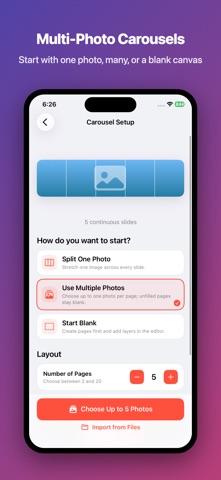
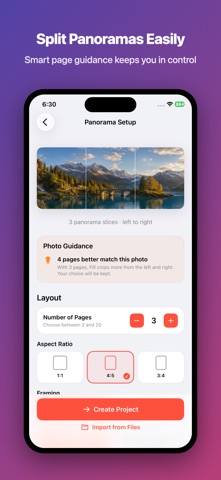
Turn photos into polished profile grids, seamless carousels, and panorama slides—right on your iPhone. SlideGrid is a precise, private workspace for creating social-ready image sequences. Choose a photo, preview every slice, then export the full set in the correct order. CREATE PROFILE GRIDS • Split one photo into a clean 3-column grid • Choose layouts from 3×1 to 3×6 • Reframe, rotate, adjust color, and choose a background • Preview the finished profile layout before export MAKE SEAMLESS CAROUSELS • Build a continuous canvas across 2–20 slides • Place one photo across multiple pages or combine several photos • Start with one photo, multiple photos, or a blank canvas • Refine backgrounds and simple image adjustments • Check every slide and edge before saving SPLIT PANORAMAS • Turn wide photos into swipeable panorama slides • Get an automatic page-count suggestion • Choose Fit or Fill and left-to-right or right-to-left order • Keep details sharp with high-quality export PREVIEW AND EXPORT WITH CONFIDENCE • Preview the full canvas, individual slides, or profile grid • Export JPEG, PNG, or HEIC • Choose square, portrait, or custom sizes • Save to Photos or Files, or open the Share Sheet • Follow a clear posting-order guide so every image lands correctly PRIVATE BY DESIGN Your photos are processed on your device. They are not uploaded to our servers. No account is required. FREE TO START Create real grids and carousels with no forced watermark. The free version includes 3×1, 3×2, and 3×3 grids, up to 5 carousel slides, JPEG export, and high-quality output. UPGRADE ONCE SlideGrid Pro is a one-time purchase that unlocks all grid layouts, up to 20 carousel slides, panorama mode, custom sizes, PNG and HEIC export, maximum quality, custom and transparent backgrounds, and unlimited projects.
Latest release
What’s New
Bug fixes and improvements.
Audience growth
Ratings growth
Baseline captured. Growth appears after the crawler observes a changed rating count.
Momentum comes from crawler snapshots for the tracked storefront. “Viral growth signal” means unusually fast recent rating gains; it is an indicator, not download data.
Price tracking
Price intelligence
First snapshot captured. The trend line starts after the next crawler price observation.
- First observed Aug 19, 2026 · 7:28 AM Free
Screenshots