About this app
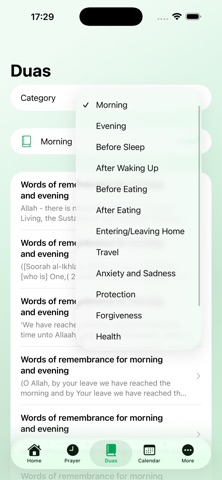
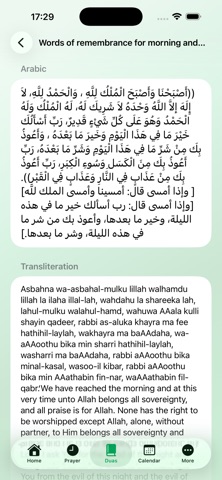
Bring faith, reflection and prayer into your daily routine with Noor Daily – Islamic Guide. Discover inspiring Islamic quotes, follow daily prayer times, explore meaningful duas and stay informed about important dates in the Islamic calendar—all through a peaceful and easy-to-use experience. FREE FEATURES • Islamic Quote of the Day • Quran verses, hadith and Islamic wisdom • Arabic text, translation and source references • Daily prayer times • Countdown to the next prayer • Gregorian and Hijri dates • Upcoming Islamic events • Save your favorite quotes • Light and dark themes NOOR PREMIUM Upgrade to Noor Premium to unlock: • Prayer notifications for Fajr, Dhuhr, Asr, Maghrib and Isha • Custom reminders before each prayer • A categorized library of daily duas • Islamic calendar and event reminders • Share quotes and duas as beautiful images • Unlimited favorites • Qibla direction • Digital tasbih • Additional personalization options DUAS FOR EVERY MOMENT Find duas for morning and evening, sleep, travel, protection, forgiveness, family, health, anxiety, Ramadan and many other moments in everyday life. Each available entry includes Arabic text, transliteration, translation and source information. PRAYER TIMES FOR YOUR LOCATION View daily prayer times based on your selected location and calculation settings. Choose your preferred calculation method, time format and prayer adjustments. ISLAMIC CALENDAR Follow Hijri dates and learn about Ramadan, Eid al-Fitr, Eid al-Adha and other important Islamic occasions. Dates may vary by one day depending on local moon sighting and the announcement of your local Islamic authority. Noor Daily is designed to be a calm and helpful Islamic companion that supports daily remembrance, reflection and worship. Some features require a Noor Premium subscription. Subscriptions automatically renew unless cancelled at least 24 hours before the end of the current subscription period. You can manage or cancel your subscription through your Apple ID account settings. Noor Premium is an auto-renewable subscription that unlocks premium features including prayer notifications, full dua library, Islamic calendar, Qibla compass, digital tasbih, unlimited favorites, and Apple Watch support. Terms of Use (EULA): https://www.apple.com/legal/internet-services/itunes/dev/stdeula/ Privacy Policy: https://sites.google.com/view/noorislamicguide
Latest release
What’s New
Small improvements and bug fix.
Audience growth
Ratings growth
Baseline captured. Growth appears after the crawler observes a changed rating count.
Momentum comes from crawler snapshots for the tracked storefront. “Viral growth signal” means unusually fast recent rating gains; it is an indicator, not download data.
Price tracking
Price intelligence
First snapshot captured. The trend line starts after the next crawler price observation.
- First observed Sep 4, 2026 · 1:46 AM Free
Screenshots