About this app
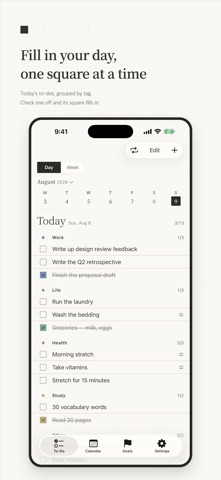
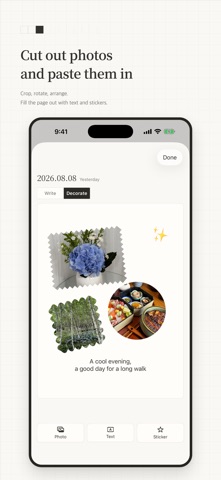
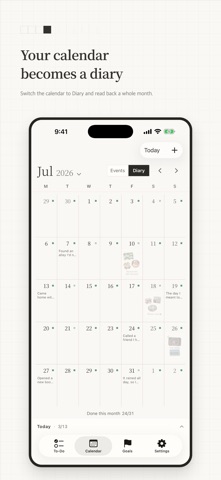
Gridpaper doesn't draw the picture for you. It just makes a blank page easier to start. Gridpaper brings your to-dos, events, yearly goals, and a diary you can decorate into one place. ■ Fill in your day, one square at a time Move between Day and Week as you write. Tag a to-do and it joins that tag's own section, marked with a small patch of color. Check something off to fill its square in. Nothing disappears — the line just moves down the list. Press and hold a to-do to move it to tomorrow, repeat it tomorrow, or send it to another date. ■ Turn repeats into routines Set a to-do to come back daily, on certain weekdays, or on whatever schedule suits it. Skip a single day when you need to, and the rule stays as it is. ■ A whole month on a single page Keep events and diary entries together on the calendar. If you like, days you finished your list can keep a small mark — in a color you choose. ■ A diary you can decorate Add photos, tilt them, and trim them into the shape you want. Lay text and stickers on top to make the page your own. Every entry you write sits as a small thumbnail on its day in the calendar. ■ Count your year in squares Set a yearly goal and break it into milestones — or into a count, like 24 books, with a grid you fill one cell at a time. Send a milestone to your to-do list whenever you're ready to work on it. ■ Paper and ink Clay-white paper, ink-dark text. Ink is the only color the app puts down on its own — the rest is yours to add. Ten traditional Korean colors, drawn from dancheong painting and jogakbo patchwork, color your tags and goals. ■ Where your writing lives Everything stays on your device and in your own iCloud. Nothing is sent to a developer's server, and the person who made this app cannot read it. Your records show up on every device signed in to the same Apple Account. ■ Two languages Gridpaper is written in Korean and English. If your device is in one language but you'd rather read the app in the other, you can set the app's language on its own.
Latest release
What’s New
- Fixed the starter tags appearing twice — "Work" and "Study" could each show up two times after a fresh install. This build tidies them up on its own. - Fixed reminders that could still fire for events you had deleted. Gridpaper now checks its pending reminders against your events every time it opens. - Coming back to To-dos or the Calendar from another tab returns you to today. - "Today" and "This year" now sit in the same place, at the same size, on all three screens. - The labels on a diary's photo toolbar no longer get cut off, and the font preview shows a letter from the language you write in.
Audience growth
Ratings growth
Baseline captured. Growth appears after the crawler observes a changed rating count.
Momentum comes from crawler snapshots for the tracked storefront. “Viral growth signal” means unusually fast recent rating gains; it is an indicator, not download data.
Price tracking
Price intelligence
First snapshot captured. The trend line starts after the next crawler price observation.
- First observed Aug 24, 2026 · 1:16 AM Free
Screenshots