About this app
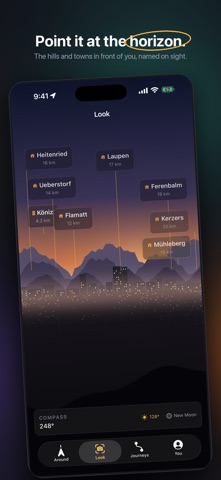
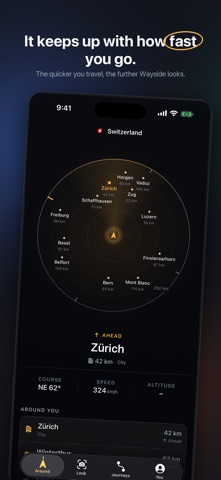
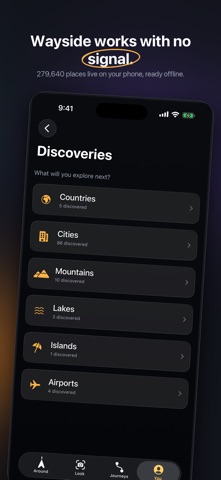
Wayside turns every journey into a window to the world around you. Whether you’re driving, flying, riding a train, sailing or exploring on foot, Wayside helps you understand what’s around you without needing to open a traditional map. SEE WHAT’S AROUND YOU Wayside uses your iPhone’s location and direction of travel to show important places around you. See what’s: • Ahead of you • To your left • To your right • Nearby Each place is shown with its direction and distance, so you can understand your surroundings at a glance. LOOK AROUND WITH AR Point your iPhone toward the horizon and use Look mode to discover places in that direction. Wayside combines your location and device orientation with geographic data to place useful labels over the world around you. MADE FOR EVERY JOURNEY Use Wayside while: • Flying • Driving • Riding trains • Sailing • Cycling • Walking and exploring ON A PLANE? See which cities and places you’re passing, along with your altitude, ground speed and direction of travel. ON THE ROAD? See towns, cities and interesting places as you travel past them without constantly searching a map. OFFLINE FIRST Wayside is designed to remain useful when your connection disappears. 279,640 places across 252 countries are stored on your device, while your iPhone’s location sensors determine where you are. That makes Wayside useful in the air, on remote roads, at sea and anywhere else connectivity may be limited. DISCOVER YOUR WORLD Keep track of the places you discover during your journeys and build a personal history of the world you’ve explored. PRIVATE BY DESIGN No account required. Your journeys and discoveries are stored on your device. NO SUBSCRIPTIONS Buy Wayside once and get the complete experience. No subscription. No advertisements. No recurring payment. Wherever you’re going, there’s more around you than you think. Wayside helps you see it.
Latest release
What’s New
Wayside 1.1 brings a more reliable and natural way to explore what’s around you. - More accurate compass direction that follows where you point your iPhone - Improved nearby discovery with more useful distances and search ranges - More reliable speed, altitude, and movement information - Smoother destination markers and transitions - Refined Look, Compass, Journeys, Discoveries, and onboarding interactions - Improved responsiveness, stability, and haptic feedback Point your iPhone somewhere and discover what’s around you.
Audience growth
Ratings growth
Baseline captured. Growth appears after the crawler observes a changed rating count.
Momentum comes from crawler snapshots for the tracked storefront. “Viral growth signal” means unusually fast recent rating gains; it is an indicator, not download data.
Price tracking
Price intelligence
First snapshot captured. The trend line starts after the next crawler price observation.
- First observed Sep 4, 2026 · 5:20 AM Free
Screenshots