About this app
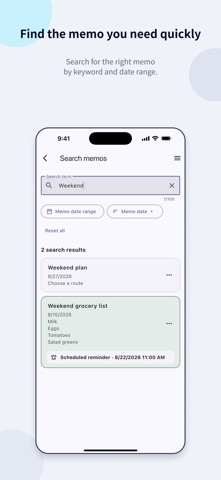
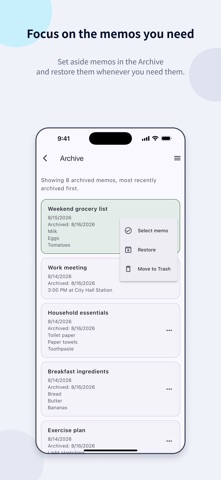
Organize plans, ideas, and everyday records by date. SteadyMemo is an app for writing and organizing memos by date. Choose a day on the calendar, add a memo, and find it easily whenever you need it. Pin important memos or use colors to tell them apart, and move finished records to the Archive. Set a reminder for a memo you need to remember, then return to it at the right time. [What you can do with SteadyMemo] - Keep memos by date and see each day's plans and records at a glance - Find the memo you want quickly using the calendar or search - Pin important memos, organize them with colors, and archive finished records - Use scheduled reminders to revisit memos when they matter - Start writing memos without creating an account [Key features] 1. Calendar memos - Create and edit memos by date from the monthly calendar - See which dates have memos and how many are saved for each date 2. Search and organize - Search titles and content - Narrow results to a date range and sort by memo date or date added - Pin memos, assign colors, and change their order within each date - Move finished memos to the Archive and restore them when needed - Restore deleted memos from Trash for 30 days or delete them permanently 3. Scheduled reminders - Choose a date and time to set a reminder for a memo - Set a reminder for each memo, with either one notification or up to 3 additional notifications at your chosen interval until confirmed - Use reminders for schedules, appointments, and tasks you do not want to miss 4. Backup and restore - Save memos in a backup file - Load a saved backup file to restore memos [Data and permissions] Memo content stays on your device and is not automatically sent elsewhere. You can write, search, and organize memos without creating an account or connecting to the internet. Automatic online backups and cross-device syncing are not available. You can create and keep a backup file yourself, then restore it later. Backup files are not encrypted, so keep them in a secure location that other people cannot access. Reminder settings are included, but only reminders scheduled for a future time are restored. Scheduled reminders require notification permission on your iPhone. Terms of Use (EULA): https://www.apple.com/legal/internet-services/itunes/dev/stdeula/ Privacy Policy: https://steadyseller.com/home/en/privacy-policy
Audience growth
Ratings growth
Baseline captured. Growth appears after the crawler observes a changed rating count.
Momentum comes from crawler snapshots for the tracked storefront. “Viral growth signal” means unusually fast recent rating gains; it is an indicator, not download data.
Price tracking
Price intelligence
First snapshot captured. The trend line starts after the next crawler price observation.
- First observed Sep 6, 2026 · 2:14 PM Free
Screenshots