About this app
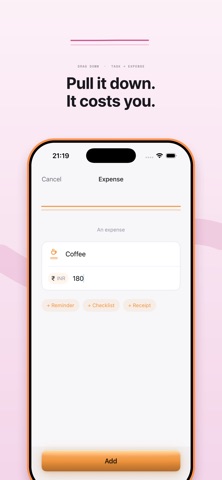
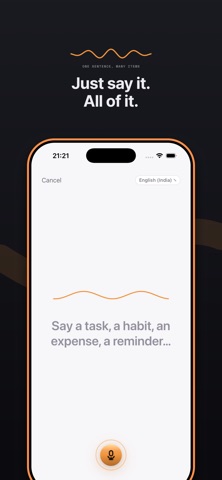
Multi puts your tasks, habits, and expenses in one place, because your day already works that way. You do not plan tasks in one app, track habits in another, and log spending in a third. Multi treats them as one thing that just takes different shapes. Add anything with a single motion. Type it, or say it out loud. Pull the line up and it becomes a habit that repeats. Pull it down and add an amount, and it becomes an expense. Do both, and it is a recurring expense, like rent or a subscription. Nothing is buried behind menus or toggles. You draw what the item is, right as you create it. WHAT YOU CAN DO Capture tasks, habits, reminders, and expenses in one list, with one gesture and one flow. No switching apps to remember what you owe, what you meant to do, or what you promised yourself you would keep up. Speak your day out loud. Say a few things at once and Multi splits them into separate items, in your own words, then shows you what it heard before saving anything. Watch a habit's history as a wave, not a grid of checkboxes. Peaks are days you showed up. Flat stretches are days you missed. It reads like a heartbeat, not a scoreboard. See a year of consistency at a glance with a dot calendar built for noticing a pattern, not counting a streak down to zero. Track spending per item, in its own currency, with receipt scanning that reads a total and offers it to you rather than typing one in for you. You always get the final say. Set reminders with real schedules. Once, daily, weekly, or on specific days, with one or more times a day, whatever actually matches how the thing happens. Attach a photo or a PDF to any expense as proof, kept out of the way until the moment you need it. Get a monthly budget alert the instant your spending crosses the line you set for yourself. No end of month surprise. See your day from the Home Screen with widgets, and add or complete items by voice through Siri. Sync privately across your devices with iCloud and Sign in with Apple. No account is required to use the app at all. Export everything you have entered as CSV or JSON, any time you like, for your own records. WHY IT LOOKS DIFFERENT Most task apps and habit trackers borrow the same checkbox and the same grid everyone else uses. Multi is built around one idea: a line. A flat line is a task. A wave is a habit. A doubled line is money. That single motif runs through every screen, the app icon, the widgets, and the way you add something new. It is not decoration sitting on top. It is the data model itself, drawn so you can actually see it. HOW IT'S PRICED Plain tasks are unlimited, always, for free. You can also keep up to three habits, ten expenses, and five reminders on the free plan. Add more with Multi Pro whenever you outgrow that. A two week trial unlocks everything so you can decide with the full picture in front of you, not a locked screen guessing at what you are missing. Pro also unlocks eight color themes and matching app icons, because something you open every single day should look like it is actually yours. YOUR DATA STAYS YOURS Multi runs entirely on your device unless you choose to turn on iCloud sync, which uses your own Apple account and nothing else. There is no ad tracking, no data broker, and no server of ours that your information ever has to pass through. Whether you are trying to build a habit, stay on top of a to do list, keep an eye on your spending, or just want one honest place for the parts of your day that used to live in three separate apps, Multi is built to hold all of it without ever feeling crowded. SUBSCRIPTION TERMS Payment is charged to your Apple Account at purchase. Subscriptions renew automatically unless auto-renew is turned off at least 24 hours before the period ends. Manage or cancel in Apple Account settings. Terms of Use (EULA): https://www.apple.com/legal/internet-services/itunes/dev/stdeula/ Privacy Policy: https://getmulti.app/privacy
Audience growth
Ratings growth
Baseline captured. Growth appears after the crawler observes a changed rating count.
Momentum comes from crawler snapshots for the tracked storefront. “Viral growth signal” means unusually fast recent rating gains; it is an indicator, not download data.
Price tracking
Price intelligence
First snapshot captured. The trend line starts after the next crawler price observation.
- First observed Aug 25, 2026 · 10:39 PM Free
Screenshots