About this app
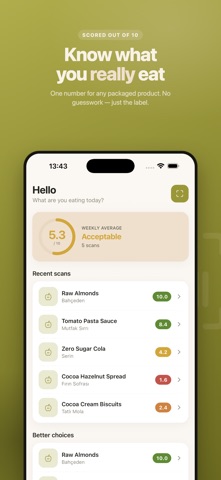
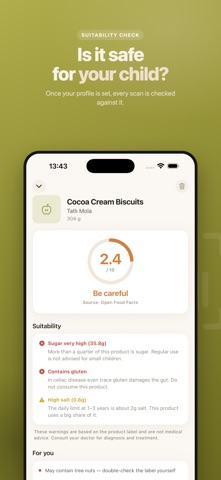
BiteScan scans packaged food and gives it a single score out of 10 — no account, no guesswork. HOW IT WORKS Scan a barcode and get an instant, free result from an open product database. If the barcode isn't on file, photograph the label instead — BiteScan reads the ingredients and nutrition table for you. Photo-analyzed products are clearly marked as AI-read, since AI can make mistakes. WHAT YOU SEE • A 0–10 score, with the exact reasons behind it • Processing level (NOVA), from unprocessed to ultra-processed • Every additive, with its risk level explained in plain language • Full nutrition facts and ingredient list BUILT AROUND YOUR PROFILE Set your age group — from 0–6 months to pregnancy — and health conditions like celiac disease, diabetes, PKU, or kidney disease. Every scan is checked against your profile and flags what matters to you specifically. Add allergens and dietary preferences (vegan, gluten-free, and more) to catch conflicts before you buy. PRIVATE BY DESIGN Your profile, health conditions, and scan history stay on your device — never uploaded, never linked to an account. Barcode scans send only the barcode number. Photo analysis sends just the label image, and it is never stored. NOT MEDICAL ADVICE Scores and warnings are based on the product label and open databases. They are not medical advice — always check the product's own label and consult your doctor for allergies, celiac disease, PKU, diabetes, kidney disease, or infant feeding decisions. Available in English, Turkish, German, French, Spanish, Italian, Portuguese, Russian, and Arabic.
Latest release
What’s New
This release fixes a problem in photo label analysis. • When the analysis service was under load, requests were abandoned after a single attempt and the analysis failed. They are now retried automatically. • If the service really is busy, you now see a message explaining that, instead of a generic error. Barcode scanning was never affected and still isn't: products found by barcode come straight from an open database. Thanks for the feedback.
Audience growth
Ratings growth
Baseline captured. Growth appears after the crawler observes a changed rating count.
Momentum comes from crawler snapshots for the tracked storefront. “Viral growth signal” means unusually fast recent rating gains; it is an indicator, not download data.
Price tracking
Price intelligence
First snapshot captured. The trend line starts after the next crawler price observation.
- First observed Sep 17, 2026 · 6:44 AM Free
Screenshots